You might like:


About this App
Amazing animated lights show on your wrist
Introducing the Northern Lights watchface for Wear OS — a dazzling masterpiece that seamlessly blends functionality with the ethereal beauty of the Arctic skies. This watchface transforms your wrist into a canvas where technology meets the wonders of the natural world, offering a truly immersive experience.
🎅 Explore the entire Christmas Collection in our new Watchface Shop app and grab the best value with a bundle that includes all seasonal watchfaces. Discover your perfect Christmas style - https://play.google.com/store/apps/details?id=com.starwatchfaces.watchfaces 🎅
At the heart of Northern Lights is a captivating animated image of a majestic mountain silhouette, setting the stage for the main event. As time unfolds, watch in awe as the sky comes alive with the mesmerizing dance of the northern lights — a celestial spectacle that transcends the ordinary and elevates your wearable to a realm of extraordinary sophistication.
With its versatile design, Northern Lights caters to both 12 and 24-hour time formats, ensuring a seamless integration into your daily rhythm. The date, intelligently displayed in your device's language, becomes a subtle yet essential element of the watchface, harmonizing with the overall aesthetic.
Stay in tune with your well-being through real-time fitness tracking. Monitor your steps, keep an eye on your heart rate, and stay ahead of the day with at-a-glance battery information. The watchface doesn't just keep time; it empowers you to embrace a holistic approach to a healthier, more mindful lifestyle.
Customization takes center stage with a vibrant palette of 30 color themes, allowing you to tailor Northern Lights to your personal style. Whether you prefer bold and striking hues or calming, understated tones, the watchface adapts to your mood and outfit seamlessly.
Effortlessly access your favorite apps with the convenience of two customizable shortcuts. Whether it's messaging, fitness tracking, or your go-to productivity tool, the Northern Lights watchface puts your most-used functionalities right at your fingertips.
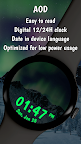
Even when your watch takes a moment to rest in Ambient Mode, Northern Lights continues to shine. The Always-On Display (AOD) is optimized for low power consumption while maintaining readability, ensuring that your watch remains an elegant and practical accessory throughout the day.
In Northern Lights, technology meets nature, resulting in a harmonious blend of functionality and visual splendor. Elevate your Wear OS experience with a watchface that doesn't just tell time but weaves a narrative of beauty and sophistication every time you glance at your wrist. Discover the extraordinary with Northern Lights.
To customize the watchface and change the color theme or the complications, press and hold on the display, then tap the Customize button and customize it the way you want.
Don't forget: use the companion app on your phone to discover other amazing watchfaces made by us!
For more watchfaces, visit our website.