You might like:


About this App
Animated butterfly, a perfect blend of style, functionality, and beauty for you!
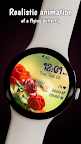
Introducing Spring Butterfly watchface for Wear OS, an elegant, animated timepiece that will bring life and beauty to your wrist. This stunning watchface features an animated butterfly, fluttering gracefully against a backdrop of 10 stunning and charming background images. The butterfly adds a touch of nature and grace to your device, making it a joy to look at and wear.
The watchface features a clear and crisp digital 12/24H clock, displaying the time with accuracy and ease. The date is displayed in your preferred language, ensuring that you always know the day and month with a glance. The watchface also keeps track of your heart rate and steps, helping you stay active and healthy.
In addition to its stunning design and animations, the Spring Butterfly watchface is also highly customizable. You can choose one of the over 20 available color themes and one of the 10 cute backgrounds to create your own unique look. You can also add a custom complication to the watchface, giving you quick and easy access to your favorite data. With two customizable shortcuts, you can quickly access the functions you need with just a tap.
Spring Butterfly watchface is the perfect addition to your device, combining style, functionality, and beauty in a single package. Whether you are looking for an animated timepiece to wear every day, or a special watchface for special occasions, the Spring Butterfly watchface is sure to exceed your expectations. With its superb animation and beautiful design, this watchface will make a statement on your wrist and bring a smile to your face every time you look at it.
To customize the watchface:
1. Press and hold on the display
2. Tap the Customize button to change the background image, the colors for time, date and stats, data for complication to display and the apps to launch with the custom shortcuts.
Customize the watchface as you wish: choose the background you like most, choose the best looking color theme for time, date and stats, select the data you want for the complication, select your desired apps to launch using the 2 customizable shortcuts and enjoy using the watchface! Check the screenshots from the store listing to better understand where the shortcuts are placed.
Don't forget: use the companion app on your phone to discover other amazing watchfaces made by us!
If you have issues installing the watchface, Samsung provided a detailed tutorial here: https://developer.samsung.com/sdp/blog/en-us/2022/11/15/install-watch-faces-for-galaxy-watch5-and-one-ui-watch-45
Heart rate on watch face is automatically measured every 10 minutes in order to save you battery. Please make sure that the watch is worn correctly all the time on the wrist.
When the heart rate is measured, a little animation with a beating heart will be shown over the heart icon on the watch face.
You can also tap the heart rate text to measure the heart rate on request.
The complication can display*:
- Weather
- Feels like temp
- Barometer
- Bixby
- Calendar
- Call History
- Reminder
- Steps
- Date and weather
- Sunrise/sunset
- Alarm
- Stopwatch
- World Clock
- Battery
- Unread notifications
To display the data you want, tap and hold on the display, then press the Customize button and choose the data you want for the 2 complications.
* these functions are device dependent and might not be available on all watches
To display the shortcut you want, tap and hold on the display, then press the Customize button and choose the shortcut you want for the 2 customizable shortcut slots.
For more watchfaces, visit our website.
Enjoy!