You might like:


About this App
Beautiful and intuitive, the Tecarta Bible is the fastest Bible app available.
The NLT Bible for Android
The FASTEST Bible app and most efficient way to read & study the Bible. Quickly navigate to any verse and easily access tools to help further your understanding of the Bible. Over 5 million downloads on both iOS and Android, and over 400,000 people reading their Bibles each week!
The New Living Translation is a clear and contemporary English translation, considered by many to be easier to understand than many alternatives. The NLT reads like a good story book. By translating entire thoughts (rather than just words) into natural, everyday English, the NLT attempts to make the same impact in the life of modern readers that the original text had for the original readers.
FEATURES:
• Take Notes
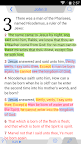
• Highlight or Underline words & entire verses
• Bookmark Verses
• Add Margin Notes
• 4 types of Navigation (Scroll Wheel, 3-Tap, 2-Tap, & Keyboard)
• Full Screen Immersive Mode by a simple double tap (Android KitKat and higher)
• Folders to organize your notes & bookmarks
• Access Study Bibles & read the study notes beside the Bible
• Offline (No Internet connection required for downloaded Bibles)
• Red Letter text for Jesus' words
• Search the Old & New Testament to find verses containing the entered keyword
• Night mode for low-lit reading areas
• History folder to access past 50 viewed verses
• Split-screen mode to read two Bible translations at once
• Share verses & notes via Google+, Facebook, Twitter, email, & SMS
• Bible talks to you! Text-to-Speech allows the Bible to be read to you out loud
• Change font size and font type
• Auto scroll allows the Bible to scroll automatically
• Backup all your purchases and created Bible data using a FREE TecartaBible.com account
• Cross References & Footnotes by long-pressing on dotted-underlined words & superscript letters
IN-APP CONTENT:
• Bibles (KJV, NIV, NKJV, ESV, GW, MSG, NCV, and more!)
• Commentaries (Matthew Henry's Concise, Commentary Critical & Explanatory on the Whole Bible, John Wesley's Explanatory Notes, John Gill's Exposition on the Whole Bible, and more!)
• Study Bibles (NIV Study Bible, NKJV Study Bible, NIV Woman's Study Bible, Lucado Life Lessons Bible, and more!)
• Devotionals (One Year Devos)
If you have suggestions, questions, or comments we would love to hear from you! Email us at androidsupport@tecarta.com
If you need help or want to see all the features in your Tecarta Bible, please visit our Help website at http://tecartabible.com/help/