You might like:


About this App
NFC Tools can read and write NFC tags.
NFC Tools is an app which allows you to read, write and program tasks on your NFC tags and other compatible NFC chips.
Simple and intuitive, NFC Tools can record standard information on your NFC tags which will be compatible with any NFC device. For instance, you can easily store your contact details, an URL, a phone number, your social profile or even a location.
But the app goes further and allows you to program tasks on your NFC tags in order to automate actions that were once boringly repetitive. Turn on the Bluetooth, set an alarm, control the volume, share a WiFi network configuration and more.
A simple motion with your phone in front of your NFC tag before going to sleep, and your phone will switch to silence and your alarm will be set for the next morning, all by itself. Very convenient, isn't it?
For the most tech-savvy of you, the geeks, preset variables, conditions and advanced tasks are also available so you can create more complex actions.
Make your life easier with more than 200 tasks available and an infinite number of combinations.
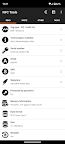
Passing your device near an NFC chip on the “Read” tab allows you to see data such as:
- The manufacturer and the type of tag (eg : Mifare Ultralight, NTAG215).
- The serial number of the tag (eg : 04:85:c8:5a:40:2b:80).
- What technologies are available and the standard of the tag (eg: NFC A, NFC Forum Type 2).
- Information about the size and memory.
- If the tag is writable or locked.
- And the last but not least, all the data the tag contains (NDEF records).
The "Write" tab lets you record standardised data such as:
- A simple text, a link to a website, video, social profile or an app.
- An email, a phone number or a predefined text message.
- A contact information or an emergency contact.
- An address or geolocation.
- A WiFi or Bluetooth configuration.
- And more.
The write function allows you to add as much data as you wish, this way you can record large quantities of information on your tag.
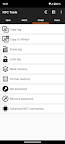
Other features are available under the "Other" tab, such as copying, erasing and password protecting your NFC tag.
The tasks allowing you to automate your phone are under the "Tasks" tab and are categorised.
Here are a few examples of the available actions:
- Activate, deactivate or toggle your bluetooth.
- Configure a sound profile to silent, vibrate or normal.
- Change your screen brightness.
- Set volume levels (such as your alarm, notification or ring volumes).
- Set a timer or an alarm.
- Insert an event into your calendar.
- Launch an app or an URL / URI.
- Send a text message or dial someone.
- Read aloud a text with text to speech.
- Configure a WiFi network.
- And more.
NFC Tools has been tested with the following NFC tags:
- NTAG 203, 210, 210u, 212, 213, 213TT, 215, 216, 413 DNA, 424 DNA.
- Ultralight, Ultralight C, Ultralight EV1.
- ICODE SLI, SLI-S, SLIX, SLIX-S, SLIX-L, SLIX2, DNA.
- DESFire EV1, EV2, EV3, LIGHT.
- ST25TV, ST25TA, STLRI2K.
- And Mifare Classic, Felica, Topaz, EM4x3x.
If you have any problems, don’t hesitate to contact us, we'll be pleased to help you.
Notes:
- An NFC compatible device is required.
- In order to execute tasks, you need the free app: NFC Tasks.