You might like:


About this App
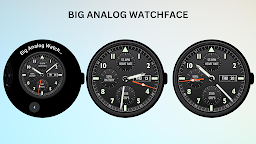
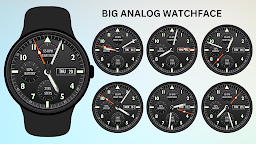
Large, bold analog watch face with heart rate, battery, steps, and date display
Experience the perfect combination of style and functionality with the Big Analog WatchFace for your Wear OS device. Featuring large, easy-to-read numbers and hands, this analog watch face gives you a bold, classic look while keeping you updated with essential health and activity data. Track your heart rate, battery status, daily steps, and the date, all at a glance, without compromising on aesthetics.
Whether you’re looking to stay active, monitor your health, or simply want a reliable and stylish watch face, the Big Analog WatchFace has everything you need for your daily routine.
Key Features:
* Bold analog design with large numbers for clear visibility.
* Heart rate monitor to stay on top of your health.
* Battery percentage display to keep your watch powered up.
* Daily steps counter to track your activity.
* Date display for quick time reference.
* Always-On Display (AOD) support for continuous time display.
🔋 Battery Tips:
Optimize your watch’s battery by adjusting brightness and turning off Always-On Display when not in use.
Installation Steps:
1)Open the Companion App on your phone.
2)Tap "Install on Watch."
3)On your watch, select the Big Analog WatchFace from your settings or watch face gallery.
Compatibility:
✅ Compatible with all Wear OS devices API 33+ (e.g., Google Pixel Watch, Samsung Galaxy Watch).
❌ Not suitable for rectangular watches.
Upgrade your smartwatch experience with the Big Analog WatchFace – your stylish and functional companion.