Featured Banner
Icon

Pastel Floral Watch Face

© jigu watchface

3.8 7752

Source: Google Play Store

Category: Personalization

Price: Free

Content Rating: for everyone

Requires: Android 1.0+

Released on: 2025-05-01

This App is not yet included in [apkz.com]. You can click the button below to request.

(The more people request, the faster it may be included)

☑ We will notify you as soon as the App is available. If you can't receive notifications, please check back often.

About this App

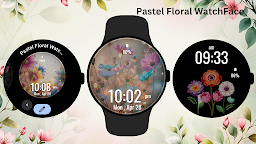
Soft pastel flowers bloom on your wrist with this elegant watch face.
Bring the beauty of spring to your wrist with the Pastel Floral Watch Face for Wear OS. This charming design showcases delicate pastel blossoms with a dreamy background, perfect for those who appreciate elegance and tranquility. Stay on top of your day with a clear digital display showing time, date, and battery status—all wrapped in a serene floral aesthetic.

🌸 Ideal For:
Nature lovers, floral design fans, and those who enjoy calm, soft visuals.

✨ Perfect for Daily Wear:
Brighten your watch with floral charm any day of the week—spring vibes all year round!

Key Features:
1)Dreamy pastel flower theme background
2)Digital clock with date and battery display
3)Ambient mode & Always-On Display supported
4)Optimized for Wear OS circular smartwatches

Installation Steps:
1)Open the Companion App on your phone
2)Tap "Install on Watch"
3)Select "Pastel Floral Watch Face" from your watch’s face settings

Compatibility:
✅ Compatible with all Wear OS devices API 33+ (Google Pixel Watch, Samsung Galaxy Watch)
❌ Not suitable for rectangular smartwatches


Let pastel flowers bloom on your wrist—serenity in every glance.

Screenshots

I'm not a robot

In order to block spam bots, we push you a notification with the following code. Please click on the notification to complete the verification.


Notifications may be slightly delayed, please wait a moment.

Or if your device is unable to receive notifications, you can also send us an email.

Tips:

Please allow [apkz.com] to show notifications. We will notify you as soon as the App is ready.

Um, Seems that the notification is not available.
Would you like to send requests and receive updates via email?

Tips:

After the download is successful, please use [APKZ App] to install it.


Unable to determine whether the file was saved successfully, please confirm it yourself before installing.

Tips:

Your browser is out of date and some features may not work properly, please change or upgrade your browser.


For a better user experience, it is recommended to use Google Chrome or Edge.

Tips:

If the download cannot be completed, please open this page in your browser.


For a better user experience, it is recommended to use Google Chrome or Edge.

Tips:

This App can only be installed on Android devices.