You might like:


About this App
Sleek and elegant classic watch face from CELEST Watches
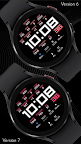
Enjoy effortless timekeeping and instant access to key data with this minimalist yet informative watch face. Its clean interface and large, easy-to-read time display ensure clear visibility at a glance, while 6 customizable complications at the bottom half provide instant access to a myriad of essential information.
Embrace customization with a touch of personal flair. Our watch face offers 12 accent color variations for the data labels and seconds, effortlessly adapting to reflect your unique style and preferences.
INSTALLATION GUIDE ↴
When attempting to install a watch face from the official Google Play Android app, you may encounter several issues.
In cases where the watch face is installed on your phone but not on your watch, the developer has included a companion app to enhance visibility on the Play Store. You can uninstall the companion app from your phone and look for a triangular symbol next to the Install button in the Play Store app (https://i.imgur.com/OqWHNYf.png). This symbol indicates a dropdown menu, where you can pick your watch as the target for installation.
Alternatively you can try to open the Play Store in a web browser on your laptop, Mac or PC. This will enable you to visually select the correct device for installation (https://i.imgur.com/Rq6NGAC.png).
[Samsung] If you followed the aforementioned instructions and the watch face still doesn't appear on your watch, open the Galaxy Wearable app. Navigate to the Downloaded section within the app, and you'll find the watch face there (https://i.imgur.com/mmNusLy.png). Simply click on it to initiate the installation.
WATCH FACE DETAILS ↴
Complications/Features:
- Battery
- Weekday, Day, Month, Year
- Week in year
- Timezone
- Timezone offset
- Moon phase
- Steps
- Steps goal percent (Progress)
- Heart rate
- 6 customizable circle complications
- 12 accent color variations
CATALOG & DISCOUNTS↴
Our online catalog: https://celest-watches.com/product-category/compatibility/wear-os/
Wear OS discounts: https://celest-watches.com/product-category/availability/on-sale-on-google-play/
FOLLOW US ↴
Instagram: https://www.instagram.com/celestwatches/
Facebook: https://www.facebook.com/celeswatchfaces
Twitter: https://twitter.com/CelestWatches
Telegram: https://t.me/celestwatcheswearos