You might like:


About this App
A classic retro LCD-style digital watch face for Wear OS with modern stats.
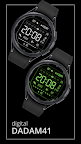
Go back in time with the classic style of the DADAM41: Retro LCD Watch Face for Wear OS! ⌚ This design celebrates the iconic look of 80s and 90s digital watches, bringing a dose of nostalgia to your modern smartwatch. It features a familiar LCD-style layout, complete with all the essential modern features like health tracking and customizable complications, all on a high-contrast black background. It's the perfect blend of retro cool and modern-day power.
Why You'll Love DADAM41:
* Authentic Retro LCD Vibe 📼: Enjoy the nostalgic and instantly recognizable style of a classic digital watch, perfectly recreated for your Wear OS device.
* Modern Features in a Classic Package modern: Get the best of both worlds with a retro look that also displays your current step count, heart rate, battery, and more.
* Clear, Functional, and Customizable 🎨: The high-contrast display is easy to read, while color options and a complication slot let you personalize your retro look.
Key Features at a Glance:
* Classic LCD-Style Time 📟: A familiar and easy-to-read digital time display with 12h/24h modes.
* High-Contrast Black Background ⚫: The classic black background ensures maximum readability and an authentic retro look, perfect for AMOLED screens.
* Daily Activity Tracking 👣: Keep track of your step count and progress toward your daily step goal.
* Heart Rate Monitor ❤️: A clear display shows your current heart rate.
* Battery Level Indicator 🔋: See your watch's remaining battery percentage.
* Date Display 📅: The current day, date are always visible.
* Customizable Data Field ⚙️: Add one extra piece of information, like the weather or a world clock, via the complication slot.
* Retro Color Options 🎨: Customize the color of the LCD display with a variety of classic and modern color themes.
* Authentic AOD ⚫: The Always-On Display maintains the classic, power-saving LCD look.
Effortless Customization:
Personalizing is easy! Simply touch and hold the watch display, then tap "Customize" to explore all the options. 👍
Compatibility:
This watch face is compatible with all Wear OS 5+ devices including: Samsung Galaxy Watch, Google Pixel Watch, and many others.✅
Installation Note:
The phone app is a simple companion to help you find and install the watch face on your Wear OS device more easily. The watch face operates independently. 📱
Discover More from Dadam Watch Faces
Love this style? Explore my full collection of unique watch faces for Wear OS. Just tap on my developer name (Dadam Watch Faces) right below the app title.
Support & Feedback 💌
Have questions or need help with the setup? Your feedback is incredibly valuable! Please don't hesitate to contact me through the developer contact options provided on the Play Store. I'm here to help!