

You might like:


About this App
Wear OS watch face built with Watch Face Studio powered by Samsung.
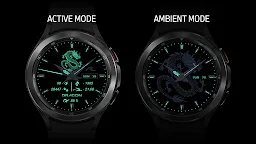
AE DRAGON
In conjunction with the Chinese 2024 zodiac sign, the year of the Dragon, is a dual mode health activity watch face. The Dragon symbolizes power, nobleness, honor, luck, and success in traditional Chinese culture. The Dragon is a supernatural being with no parallel for talent and excellence. Herein turned into a Smartwatch anchor. Comes wth six awesome dial colors.
FEATURES
• Day, and Date
• Steps count
• Distance count
• Heartrate count
• Kilocalorie count
• Battery count
• Five shortcuts
• Luminous ambient mode
PRESET SHORTCUTS
• Calendar
• Alarm
• Message
• Heartrate
• Show/Hide Dragon Activities
ABOUT THE APP
AE apps are built with Watch Face Studio powered by Samsung with an API of 30+ without secondary masking. If your device (phone) prompts “this app is not compatible wih your device (phone)”, exit and try again or browse and download from web browser on your personal computer or search watch name from your Watch.
INITIAL DOWNLOAD & INSTALLATION
During download, place the watch firmly on the wrist and ‘allow’ access to data sensors. If the download does not take place immediately, pair your watch with your device. Long tap the watch screen. Scroll counter clock until you see “+ Add watch face”. Tap on it and look for the purchased app and install it.



![AE ATLANTIS [PERPETUAL] 's icon](https://img.apkz.com/gpi/y7yz6W1WoOtw8YpNpIgxG0H6DzyoQBqm4kReJpfGwTOVtWCRWJ7XumPzHS0UF_1I7r_wAGTT_3M5Xu9cH199lg?w=96)


![AE MOTORRAD [NEXT] 's icon](https://img.apkz.com/gpi/bGCGbqcn27ekjYu8IPvoh8poL1O12q80hJZbQNnjzhdGH2FyLuNhjXVvmvMfMN-vzfvB8Hj8BH5qjG8zcr7nmg?w=96)

