
You might like:


About this App
Dynamic Wear OS watch face • day/night scenes • 3 complications • AOD
Wear OS watch face — install directly to your watch from Play Store.
On phone: Play Store → Available on more devices → your watch → Install.
To apply: the watch face should appear automatically; if it doesn’t, long-press the current face and select the new one (you can also find it under Library → Downloads on the watch).
About
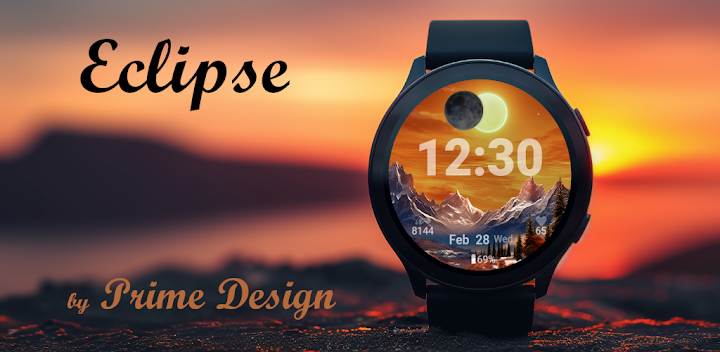
Eclipse is a dynamic, digital Wear OS watch face inspired by nature’s rhythm — from bright day to moonlit night.
Watch a warm sunrise fade to sunset, then a moonrise at midnight, mirroring the real-world light cycle.
At noon, a glowing eclipse appears — a subtle animation that makes your watch feel alive.
Features
• Digital design with smooth transitions through day and night
• Seconds display (new in this version)
• 3 complications, 3 custom app shortcuts for quick access to your favourite apps
• Auto day/night theme with eclipse animation at noon
• AOD (Always-on display) – simplified moon scene for minimal battery use
• Dynamic data: steps / heart rate visible only when active > 0
• Customization: color themes, seconds, complication layout
• 12 / 24-hour support
• No phone companion required — standalone on Wear OS
How to customize
Long-press the face → Customise →
• Complications: choose any provider (Battery, Steps, Calendar, Weather …)
• Seconds style: ON, OFF
• Style: adjust theme colors
Not sure about compatibility?
If you’re uncertain, start with our Free Watch Face to test how Prime Design faces work on your device.
Free Watch Face: https://play.google.com/store/apps/details?id=com.primedesign.galaxywatchface
Support & feedback
If you enjoy our watch faces, please consider rating the app.
For any issues, contact us via the email listed under App support — your feedback helps us improve.


