You might like:


About this App
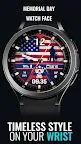
A unique watch face design brilliantly capturing American cultural themes.
Memorial Day Watch Face
A unique watch face design brilliantly capturing American cultural themes with the US flag.
This watch face is designed by Tancha Watch Faces for use on Wear OS devices.
Experience patriotic pride on your wrist with this bold American flag watch face.
Honoring the stars and stripes, it combines an embroidered flag backdrop with functional displays like step counts, weather, and date/time.
Crafted for Watch enthusiasts who want to showcase American spirit in a sophisticated way.
Customize the complications to make it your own expression of national fervor.
A must-have for Fourth of July or any day you want to proudly represent the USA.
FEATURES
Memorial Day Watch Face
Analog/Digital time display
Custom complications
Always-on display
This feature list concisely highlights the key capabilities of the watch face.
It covers the essentials like time/date display, customization options,
fitness tracking features like heart rate and step counting,
as well as useful extras like battery temperature monitoring and always-on mode.
FAQ :
1- The watch face is installed on your watch but does not appear in the catalog?
FOLLOW THESE STEPS:
Press and hold your watch screen.
Swipe right until you see the text 'Add watch face.'
Press the '+ Add watch face' button.
Find and activate the watch face you installed.
2- If the companion app is installed but the watch face is not, follow the steps below:
FOLLOW THESE STEPS:
Open the companion app on your phone (ensure that your smartwatch is connected to your phone).
Next, tap the 'INSTALL WATCH FACE ON WATCH' button at the bottom of the app.
This will open the Play Store on your WEAR OS smartwatch, displaying the purchased watch face and allowing you to install it directly.
If you have any questions or requests, please don't hesitate to get in touch with me at tanchawatch@gmail.com.
Thank you sincerely for your support.
Best regards,
Tancha Watch Faces