Featured Banner
Icon

Earth and Moon

© Eugeniy Radzivill

187

Source: Google Play Store

Category: Personalization

Price: USD 0.99

Content Rating: for everyone

Requires: Android 1.0+

Released on: 2024-11-04

[apkz.com] do not include Paid App , please go to Google Play to buy it.

(The more people request, the faster it may be included)

☑ We will notify you as soon as the App is available. If you can't receive notifications, please check back often.

About this App

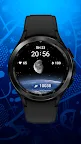
Earth and Moon watch face for Wear OS smartwatches
The watch face for Wear OS smartwatches supports the following functionality:

- Multilingual display of date and day of the week. The language is synchronized with the settings of your smartphone
- Automatic switching of 12/24 hour modes. The watch display mode is synchronized with the set mode on your smartphone
- Battery charge display
- Number of steps taken
- Current heart rate
- Current moon phase according to the calendar day

CUSTOMIZATION:
The watch face has 5 tap zones that will allow you to customize the quick access to applications installed on your watch. The settings are made through the watch face menu

IMPORTANT! I can guarantee the correct operation of the tap zones only on Samsung watches. Unfortunately, I cannot guarantee the operation on watches from other manufacturers. Please keep this in mind when purchasing the watch face.

I made an original AOD mode for this watch face. To display it, you need to activate it in your watch menu.
For comments and suggestions, please write to e-mail: eradzivill@mail.ru

Join us on social networks

https://vk.com/eradzivill
https://radzivill.com
https://t.me/eradzivill
https://www.facebook.com/groups/radzivill

Sincerely,
Eugeniy Radzivill

Screenshots

I'm not a robot

In order to block spam bots, we push you a notification with the following code. Please click on the notification to complete the verification.


Notifications may be slightly delayed, please wait a moment.

Or if your device is unable to receive notifications, you can also send us an email.

Tips:

Please allow [apkz.com] to show notifications. We will notify you as soon as the App is ready.

Um, Seems that the notification is not available.
Would you like to send requests and receive updates via email?

Tips:

After the download is successful, please use [APKZ App] to install it.


Unable to determine whether the file was saved successfully, please confirm it yourself before installing.

Tips:

Your browser is out of date and some features may not work properly, please change or upgrade your browser.


For a better user experience, it is recommended to use Google Chrome or Edge.

Tips:

If the download cannot be completed, please open this page in your browser.


For a better user experience, it is recommended to use Google Chrome or Edge.

Tips:

This App can only be installed on Android devices.