
You might like:


About this App
Wear OS watch face, built and tested with Watch Face Studio powered by Samsung.
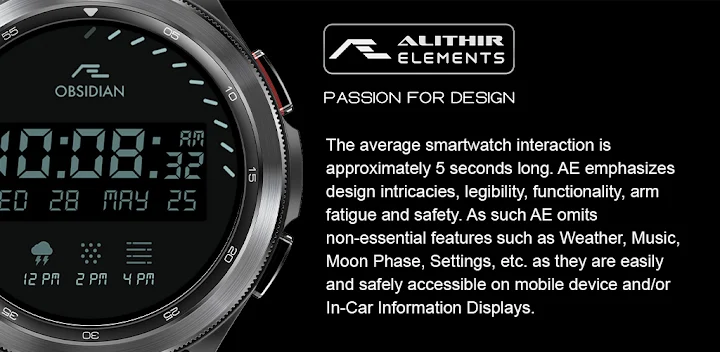
AE OBSIDIAN
Evolved from AE OBSIDIAN Tactical, Classic, and now Digital. A simple yet attractive, with AE’s signature “dual mode” it is a functional digital watch that suits all occasions. AE’s luminosity requires no introduction, trend-setting super luminosity day or night.
FUNCTIONS OVERVIEW
• Dual mode
• 12H /24H Digital Clock
• Day, Date, Month, and Year
• Heartrate count
• Steps count
• Up to six hours weather forecast
• Battery reserve status bar
• Show/hide activity data
• Five shortcuts
• Always ON Display
PRESET SHORTCUTS
• Calendar (events)
• Alarm
• Message
• Refresh Heartrate*
• Show/hide heart rate and steps count
Refer to the ‘SHORTCUT’ screenshot to locate the shortcuts. By tapping on the ‘Dark mode’ shortcut, the watch will switch over to a blacked-out dial.
REFRESH HEART RATE
The refresh heartrate shortcut has been tested on Galaxy Watch 4 and Watch 4 Classic. During installation, allow access to sensor data on the watch. Place the watch firmly on the wrist and wait a moment for the app to initialize the heartrate or
Tap on the indicated shortcut to jump-start the sensors for the first time, and give it a moment for the sensors to do their work. The Heartrate will indicate the current heartrate (bpm) when the measurement is completed, approximately between 3 – 10 seconds. Subsequent refresh takes 3 – 5 seconds.
ABOUT THIS APP
All functions and features of this App have been tested on Galaxy Watch 4 and Watch 4 Classic and worked as intended. The same may not apply to other watches. The app is subject to change for quality and functional improvements.


![AE ATLANTIS [PERPETUAL] 's icon](https://img.apkz.com/gpi/y7yz6W1WoOtw8YpNpIgxG0H6DzyoQBqm4kReJpfGwTOVtWCRWJ7XumPzHS0UF_1I7r_wAGTT_3M5Xu9cH199lg?w=96)


![AE MOTORRAD [NEXT] 's icon](https://img.apkz.com/gpi/bGCGbqcn27ekjYu8IPvoh8poL1O12q80hJZbQNnjzhdGH2FyLuNhjXVvmvMfMN-vzfvB8Hj8BH5qjG8zcr7nmg?w=96)

