
You might like:


About this App
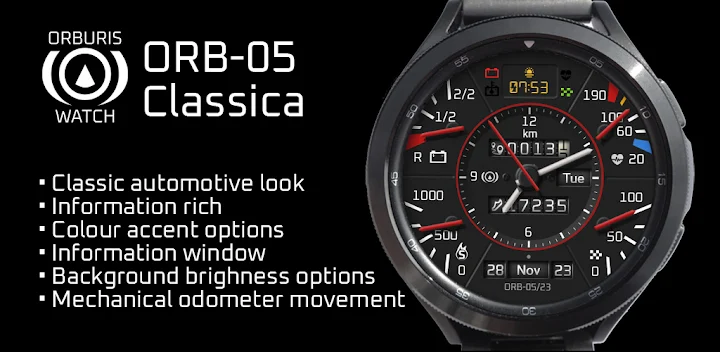
An analogue watchface for Wear OS with an automotive theme
ORB-05 draws inspiration from classic automotive instrumentation to present a detailed, clear, authentic look including:
- Realistic gauge textures, needle styles and markings
- Mechanical odometer-style display
- ‘Warning lamp’ cluster
Key Features:
- The distance-travelled display has a realistic mechanical odometer movement
- Customisable highlight ring around the clock face
- Customisable info window to display weather, sunrise/sunset etc
- Four minor analogue gauges around the main clock face
- Three faceplate shades
Composition:
There are six outer sections plus a central section, clockwise from top
Warning light cluster with:
- Battery warning light (red below 15%, and flashes green when charging)
- Goal achieved light (green when step-goal reaches 100%)
- Digital heart rate (red when heart rate exceeds 170 bpm)
- Watch battery temperature alert (blue <= 4°C, amber >= 70°C)
Heart Rate analogue gauge:
- Overall range: 20 – 190 bpm
- Blue zone: 20-40 bpm
- Upper yellow mark: 150 bpm
- Red zone start: 170 bpm
Steps Goal analogue gauge:
- Overall range: 0- 100%
- Tap this area to choose an app to open – e.g. Samsung Health. See ‘Customisation’ section for further details.
Date:
- Day, Month and Year in odometer style display
- Supports multilingual options for day and month names (details below)
- Tap this area to open the Calendar app.
Step-Calories analogue gauge:
- Overall range 0-1000 kcal (see functionality notes)
- Tap this are to choose an app to open. See ‘Customisation’ section for further details.
Battery Level analogue gauge:
- Overall range: 0 - 100%
- Red zone 0 – 15%
- Tap this area to open the battery status app
Central Section:
- Steps counter
- Day of the week
- Distance travelled (displays miles if language is UK or US English, otherwise km
Customisation:
- Long-press the watch face and select ‘Customise’ to:
- Change the background shade. 3 variations. A dot below the clock face indicates which shade is selected.
- Change the colour of the accent ring. 10 variations.
- Select the information to be displayed in the info window.
- Set/change the apps to be opened by the buttons situated over the steps goal and calories gauges.
The following multilingual capability is included for month and day-of-week fields:
Supported Languages: Albanian, Belarusian, Bulgarian, Croatian, Czech, Danish, Dutch, English (default), Estonian, French, German, Greek, Hungarian, Icelandic, Italian, Japanese, Latvian, Macedonian, Malay, Maltese, Polish, Portuguese, Romanian, Russian, Serbian, Slovenian, Slovakian, Spanish, Swedish, Turkish, Ukrainian.
Functionality Notes:
-Step Goal: For users of devices running Wear OS 3.x, this is fixed at 6000 steps. For Wear OS 4 or later devices, the step goal is sync’d with the wearer’s preferred health app.
- At present, calorie data is unavailable as a system value so the calorie count on this watch is approximated as No-of-steps x 0.04.
- At present, distance is unavailable as a system value so distance is an approximated as: 1km = 1312 steps, 1 mile = 2100 steps.
What’s new in this version?
1. Workaround to fix font display issue Wear OS 4 watch devices
2. Changed the step goal to sync with the health-app on Wear OS 4 watches
3. Added some additional shadow effects to give a more realistic depth effect
4. Modified the look of the accent ring and increased colours to 10
Support:
If you have any questions about this watch face contact support@orburis.com.
Thank you for taking an interest in this watch face.
======
ORB-05 uses the following open source fonts:
Oxanium, copyright 2019 The Oxanium Project Authors (https://github.com/sevmeyer/oxanium)
DSEG7-Classic-MINI,Copyright (c) 2017, keshikan (http://www.keshikan.net),
with Reserved Font Name "DSEG".
Both Oxanium and DSEG Font Software are licensed under the SIL Open Font License, Version 1.1. This license is available with a FAQ at http://scripts.sil.org/OFL
======


