You might like:


About this App
A clear colourful customisable digital watch face for Wear OS
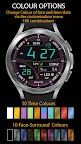
ORB-07 is a bright and informative watch face aimed at those who require at-a-glance readability and clear presentation. Users can change the colour of the time/date and of the face plate separately to provide 100 colour combinations for the active display.
Some of the features marked with a ‘*’ have additional notes in the “Functionality Notes” section below.
Features:
Face Colour:
- 10 variations selectable by long-pressing the watch face and tapping on “Customise”, and select on the “Face Colours” screen
Time/Date Colour:
- 10 variations selectable by long-pressing the watch face and tapping on “Customise”, then swipe left to “Time Colours”. The colour of Hours, Minutes, Seconds and Day-of-Month will change to the selected colour.
AOD Colour:
- The Always on Display (AOD) colours of time and date have seven variations selectable by long-pressing the watch face and tapping on “Customise”, then swiping left to “Color”. The chosen AOD colour is indicated by the colour of the Orburis logo at the top of the watch face, which changes as the colour options are browsed.
Time:
- 12/24h formats – synced with phone time format
- Digital seconds field with circular progress bar
Date:
- Day of the week
- Month
- Day-of-the-month
Step Count:
- Step Count (Steps symbol turns green when step count meets or exceeds steps goal*)
Heart Rate:
- Heart rate and heart zone information (5 zones)
- Zone 1 - <= 60 bpm
- Zone 2 - 61-100 bpm
- Zone 3 - 101-140 bpm
- Zone 4 - 141-170 bpm
- Zone 5 - >170 bpm
Distance*:
- Approximate distance walked according to the number of steps taken.
Battery:
- Battery charge progress bar and percentage display
- Battery symbol colour:
- Green at 100%
- Red at 15% or below
- White at all other times
Info Window:
- An information window which can be customisable by the user to display concise items such as the current weather, sunset/sunrise times, barometric pressure and so on. The information to display in this window can be set by long-pressing the watch face, tapping Customise and left-swiping to “Complication”, then tapping the info window location and selecting the data source from the menu.
App Shortcuts:
- Preset shortcut buttons (see pictures) for:
- Battery Status
- Schedule
- Five user-definable app shortcuts (Usr1, Usr2, Usr3, Usr4 and the area over the Step Count field) which can be set by long-pressing the watch face, tapping Customise and left-swiping to “Complication”.
Support:
If you have any questions about this watch face you can contact support@orburis.com and we will review and respond.
Functionality Notes:
- Step Goal: For Wear OS 4.x or later devices, the step goal is sync’d with the wearer’s health app. For earlier versions of Wear OS, step goal is fixed at 6,000 steps.
- At present, distance travelled is unavailable as a system value so distance is an approximated as: 1km = 1312 steps, 1 mile = 2100 steps.
- Distance is displayed in miles if locale is en_US or en_GB, otherwise km
What’s new in this version?
1. Included a workaround to display the font correctly on some Wear OS 4 watch devices, where the first part of each data field was being truncated.
2. Changed the step goal to sync with the health-app on Wear OS 4 watches. (See functionality notes).
3. Reduced the brightness of the watch background.
4. Changed preset Music shortcut to Alarm.
5. Added third user-configurable shortcut.
Keep up to date with Orburis:
Instagram: https://www.instagram.com/orburis.watch/
Facebook: https://www.facebook.com/orburiswatch/
Web: https://www.orburis.com
======
ORB-07 uses the following open source fonts:
Oxanium, copyright 2019 The Oxanium Project Authors (https://github.com/sevmeyer/oxanium)
Oxanium is licensed under the SIL Open Font License, Version 1.1. This license is available with a FAQ at http://scripts.sil.org/OFL
======