You might like:


About this App
PWW07 - Mother's Day - Heart, is stylish Watch Face for Wear OS
Introducing the PWW07 watch face - the perfect addition for all women's watches operating on the Wear OS system!
With this watch face, you can enhance your experience of wearing women's watches thanks to its modern and stylish design, specifically tailored for women. The PWW07 watch face offers many features and settings, allowing you to customize it exactly to your needs and preferences.
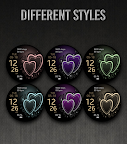
With a simple swipe between angles, you can easily switch between various information. Additionally, we offer a selection of many different themes suitable for women's watches and their wearers.
The PWW07 watch face is designed to be user-friendly and intuitive, so you don't need to be a technical expert to enjoy its full potential. Simply download it and add it to your women's watch and start using its many features right away.
Try the PWW07 watch face for your women's watch with the Wear OS system and discover a new level of personalization and functionality.
PWW07 - Ladies Digi Watch Face, is stylish Watch Face for Wear OS
Contains information:
- 12/24hr Digital Time based on phone settings
- Date
- Day
- Steps
- Battery %
- 2 App Shortcuts - You can set any application you want
- Always ON Display
- BPM Heart Rate
HEARTRATE NOTES:
The watch face does not automatically measure and does not automatically display the HR result.
To view your current heart rate data you'll need to
take a manual measurement.
To do this, tap on the heart rate display area.
Wait a few seconds. The watch face will take a
measurement and displaythe current result.
Customization:
Possibility to change the color of the background
Possibility to select any application you want 2x
Open Galaxy Wearable on your phone → watch faces → customize and set the watch face to your preference.
or
- 1. Touch and hold display
- 2. Tap on customize option
!!! Installation Notes !!!
Phone app serves only as an placeholder to make it easier to install & find the watch face on your Wear OS watch. You have to select your watch device from the install dropdown menu.
Sometimes it takes a little longer for the watch face to download to your watch !
After a few minutes the watch face will transferred on watch : check the watch faces installed by the Wearable app on the phone.
Note: If you stuck at payment loop, DON'T WORRY, only one charge will be made even if you are asked to pay a second time. Wait 5 minutes or restart your watch and try again. It could be a synchronization problem between your device and Google servers.
or
2 - If you are having synchronization problems between your phone and Play Store, install the app directly from watch: search "PWW07" from Play Store on watch and hit on install button.
3 - Alternatively, try installing the watch face from web browser on your PC.
Please consider that any issues on this side are NOT developer dependent. The developer has no control over the Play Store from this side. Thank you.
This watch face supports all Wear OS devices with API Level 28+
Make sure you have enabled all permissions from settings -> applications -> permissions.
✉ If you have any questions, please contact us by e-mail papy.hodinky@gmail.com
We will be happy to assist you!
https://sites.google.com/view/papywatchprivacypolicy