
You might like:


About this App
PWW79 - Fluttering Beauty is stylish Watch Face for Wear OS
PWW79 - Fluttering Beauty, is stylish Watch Face for Wear OS
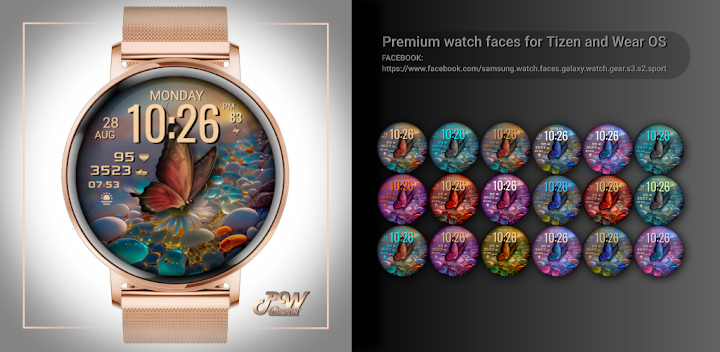
PWW79 - Fluttering Beauty is a women's watch that combines the beauty and elegance of a butterfly motif in a variety of colors with advanced health and personal style tracking features. This watch is designed for modern women who want to feel attractive while taking care of their health.
The butterfly motif gives the PWW79 a unique and distinctive look. The colorful butterflies symbolize changeability and joie de vivre, with each color evoking a different mood and energy.
With the heart rate and step display functions, you can closely monitor your physical health and activities right on your wrist. With the watch face, you'll have access to your heart rate and step count, helping you maintain an active and healthy lifestyle.
Custom complication settings allow you to personalize the watch face to your needs. You can choose to display the weather or other useful information to keep everything important in one place and ready for every moment.
Download PWW79 - Fluttering Beauty from Google Play and discover the harmony between the butterfly motif and advanced features. This women's watch face will accentuate your elegance and femininity while providing you with important information about your health and the environment. Be ready to blossom and experience the beauty of every moment with this unique watch face.
Contains information:
- 12/24hr Digital Time based on phone settings
- Date
- Day
- Steps
- Battery %
- 1x adjustable widgets
- 2 App Shortcuts - You can set any application you want
- Always ON Display
- BPM Heart Rate
HEARTRATE NOTES:
The watch face does not automatically measure and does not automatically display the HR result.
To view your current heart rate data you'll need to
take a manual measurement.
To do this, tap on the heart rate display area.
Wait a few seconds. The watch face will take a
measurement and displaythe current result.
Customization:
Possibility to change the color of the text
Possibility to change the color of the background
Possibility to select any application you want 2x
Possibility customize the fields with the any data you want - For example, you can select weather, time zone, sunset/sunrise, barometer and more ( !some features may not be available on some watches! )
Open Galaxy Wearable on your phone → watch faces → customize and set the watch face to your preference.
or
- 1. Touch and hold display
- 2. Tap on customize option
!!!! Step-by-step instructions on how to install the watch face on this link!!!!
https://developer.samsung.com/sdp/blog/en-us/2022/11/15/install-watch-faces-for-galaxy-watch-5-and-one-ui-watch-45
CHECK IMAGES IN THE PLAY STORE
!!!!! Where can I find the watch face? In the watch open the watch faces menu, go to the end of the list and click on Add watch face. You will find the new watch face in the list of watch faces. Click the icon to activate the watch face.
This app is made only for Wear OS devices.
Please select "download on your watch device" from the "INSTALL" drop-down menu.
If you can't find the app on your watch after downloading it, please use the Play Store app on your watch, use search or find it under "Apps on your phone" and install it from there. If in the store on your watch it again requires payment - please wait for a while until the synchronization takes place, soon the "set" button will appear instead of the price.
Alternatively, try installing the watch face from a web browser on your PC. Attention!!! You must have the same account!!!
Please consider that any issues on this side are NOT developer dependent. The developer has no control over the Play Store from this side. Thank you.
This watch face supports all Wear OS devices with API Level 28+
✉ If you have any questions, please contact us by e-mail papy.hodinky@gmail.com
We will be happy to assist you!
https://sites.google.com/view/papywatchprivacypolicy