You might like:


About this App
Minimalist watch face app with clean design
Embrace simplicity with a clean and modern display. Get a sleek minimalist look with our watch face app for your Wear OS Smartwatch
BOGO Promotion:
Follow these steps to benefit from this Buy One Get On Free Promotion:
1. Purchase this watch face
2. send an email with the receipt and the watch face you would like to get for free from our portfolio to watches.regarder@gmail.com
You will receive a promo code via email ASAP.
PS: if you are not getting a reply it is possible that your email went to spam. Please write again from a different email adress
Installation Notes:
1 - Make sure the watch is properly connected to the phone.
After a few minutes, the watch face will be transferred to the watch: check the watch faces installed by the Wearable app on the phone.
or
2 - If you are having synchronization problems between your phone and Play Store, install the app directly from your watch: search "Regarder Minimal 70" from Play Store on your watch and hit on install button.
3 - Alternatively, try installing the watch face from the web browser on your PC.
Please consider that any issues on this site are NOT developer-dependent. The developer has no control over the Play Store from this side. Thank you.
This watch face supports all Wear OS devices with API Level 28+.
Write to watches.regarder@gmail.com if you need assistance.
Watch face features:
- 12/24hr (based on phone settings)
- Date
- Battery
- Heart rate*
- Heart rate intervals
- Steps
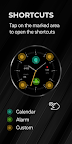
- 2 Preset App shortcuts
- Always-ON Display
*Heart Rate Notes:
The watch face does not automatically measure and does not automatically display the HR result when installed.
To view your current heart rate data you’ll need to take a manual measurement. To do this, tap on the heart rate display area (see images). Wait a few seconds. The watch face will take a measurement and display the current result.
After the first manual measurement, the watch face can automatically measure your heart rate every 10 minutes. Manual measurement will also be possible.
***some features may not be available on some watches.