You might like:


About this App
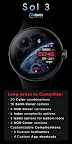
Animated digital watch face with a view of planet Earth, right on your wrist!
Sol 3 features highly detailed & optimized Earth animation, which gives you the perfect view of the "twilight zone" with waking city lights and beautiful soft glow of our atmosphere.
NOTE - The animation had to be sped-up significantly in the latest updates due to Google’s new regulations and WFF limitations.
The Earth now rotates much faster than before, so we’ve added an option of replacing it with one of 9 static images to cover the Earth animation, if that’s your preference.
Powered by Watch Face Format - offering expanded customization options and useful features!
Made only for devices running Wear OS 5.0 and newer versions (API 34+)
Please install only to your watch device.
Phone companion app serves only to help direct installation to your watch device.
Buy-One-Get-One PROMOTION
https://www.enkeidesignstudio.com/bogo-promotion
FEATURES:
- Digital clock - 12h/24h
- TAP to open Alarm
- Date, Month & Weekday - Multi-language
- TAP to open Calendar
- Moon phase indicator
- Highly detailed, shows all 28 phases
- Customizable circular indicator
- Watch battery by default
- 2 Customizable short-text indicators
- Sunrise/Sunset by default
- Steps by default
- 4 Customizable app shortcuts
- 2 hidden ones
- 2 icons at the bottom
- Dynamic animated layout
- Battery efficient & customizable AOD
- Uses just 2.5% - 4.5% active pixels
- Long-press to access Customize menu:
- Color - 20 accent colors
- Earth Cover - 10 Earth animation covers
- HUD Cover - 4 top animation covers
- Index - 6 Index complexity levels
- Icons - 3 bottom icons styles
- AOD Cover - 4 AOD styles
- Complications
- 3 Custom indicators
- 4 Custom app shortcuts
INSTALLATION TIPS:
https://www.enkeidesignstudio.com/how-to-install
CONTACT:
info@enkeidesignstudio.com
E-mail us for any questions, issues or general feedback. We're here for you!
Customer satisfaction is our main priority, we make sure to respond to each e-mail within 24 hours.
More watch faces:
https://play.google.com/store/apps/dev?id=5744222018477253424
Website:
https://www.enkeidesignstudio.com
Social media:
https://www.facebook.com/enkei.design.studio
https://www.instagram.com/enkeidesign
Thank you for using our watch faces.
Have a great day!