You might like:


About this App
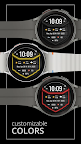
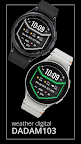
Digital watch face for Wear OS, presenting weather and health stats.
Simplify your day with the DADAM103: Weather Watch Face for Wear OS. ⌚ This modern digital watch face is designed to be your ultimate information dashboard, presenting detailed weather forecasts and your essential health metrics in one clean, streamlined view. It’s perfect for the user who wants powerful data without complex setup, offering everything you need at a single glance.
Why You'll Love DADAM103:
* Always Know the Forecast ☀️: A comprehensive weather display provides the current temperature and conditions, helping you plan your day effectively.
* Your Complete Health Overview ❤️: All your essential health statistics, including heart rate and step count, are integrated directly into the display for an easy, all-in-one overview.
* Streamlined and Focused 🎯: This watch face is designed for clarity. It shows you the most important information in a fixed, intuitive layout, enhanced by your choice of colors.
Key Features at a Glance:
* Bold Digital Time 📟: A large, central time display for instant readability in 12h or 24h format.
* In-Depth Weather Panel ☁️: Get the current temperature and conditions.
* Automatic Date Display 📅: The current day of the week, date, and month are always shown.
* Daily Step Count 👣: Track your activity throughout the day with an integrated step monitor.
* Continuous Heart Rate ❤️: Your current heart rate is displayed on-screen for easy health tracking.
* Single Data Complication ⚙️: Add one extra piece of information, like a world clock or sunrise/sunset time, to complete your dashboard.
* Multiple Color Themes 🎨: Customize the accent colors of the display to fit your personal style.
* Battery-Smart AOD ⚫: An optimized Always-On Display shows essential information in a low-power mode.
Effortless Customization:
Personalizing is easy! Simply touch and hold the watch display, then tap "Customize" to explore all the options. 👍
Compatibility:
This watch face is compatible with all Wear OS 5+ devices including: Samsung Galaxy Watch, Google Pixel Watch, and many others.✅
Installation Note:
The phone app is a simple companion to help you find and install the watch face on your Wear OS device more easily. The watch face operates independently. 📱
Discover More from Dadam Watch Faces
Love this style? Explore my full collection of unique watch faces for Wear OS. Just tap on my developer name (Dadam Watch Faces) right below the app title.
Support & Feedback 💌
Have questions or need help with the setup? Your feedback is incredibly valuable! Please don't hesitate to contact me through the developer contact options provided on the Play Store. I'm here to help!