You might like:


About this App
Enable Two Factor Authentication & secure your online accounts with Zoho OneAuth
OneAuth is an industry standard authenticator app developed by Zoho. You can now enable TFA and secure all your online accounts like Twitter, Facebook, LinkedIn, and more.
Over 1 million users trust OneAuth to enable 2FA and secure their online accounts.
Take charge of your online security with two factor authentication
- Add online accounts to OneAuth easily by either scanning a QR code or manually entering the details.
- Authenticate your online accounts using time-based OTPs. These OTPs can be accessed offline too.
- Backing up your online accounts in OneAuth is easy. We offer encrypted backup for all your online accounts and they can be recovered securely with passphrase. The passphrase is unique and known only to you and aids in recovery in case of lost or broken devices.
- OneAuth syncs your OTP secrets across all your devices, making it easy for you to access OTPs from anywhere.
- Experience OneAuth's secure authentication on Android and Wear OS devices.
- See your 2FA OTPs on the Wear OS app, and approve sign-in push notification on the go.
App shortcuts: Quickly reach and perform key actions on OneAuth directly from the home screen.
Dark theme: Reduce strain and improve your user experience by turning on dark mode.
An authenticator app that provides enhanced user experience
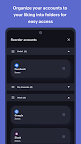
- Create folders to organize your TFA accounts to your convenience. You can create and reorder personal and work folders separately for easy access. You can also move accounts within and in between folders.
- Identify your 2FA accounts easily by associating them with their brand logos.
- Search and find your accounts quicker with OneAuth's inbuilt search.
- Explore OneAuth to its fullest potential without creating an account. Guest users can use the export and import option while switching to a new device.
- Users can also migrate their existing online accounts to OneAuth easily from Google Authenticator.
Greater security for your Zoho accounts with multi-factor authentication
Passwords are just not enough. You need additional layers to ensure your account is properly safeguarded. OneAuth does that for you!
- With OneAuth, you can enable MFA for all your Zoho accounts.
- Set up passwordless sign-in. Avoid the everyday hassle of typing out your passwords.
- Choose from multiple sign-in modes. You can select from sign-in options like push notification (to your phone or Wear OS device), QR code, and time-based OTP. In case you're offline, you can access your account with time-based OTPs.
- Toughen up your account security. Ensure only you can access your account by enabling biometric authentication (fingerprint recognition).
- Monitor devices and sessions in OneAuth, track login locations and designate devices into primary and secondary.
Think Privacy. Think Zoho.
At Zoho, data privacy and security is core to our business.
We believe that every individual has a right to access the internet securely and thus our authenticator app OneAuth will be free forever.
SUPPORT
Our help channels are available 24*7 for customers. Email us at support@zohoaccounts.com
Download today!