
You might like:


About this App
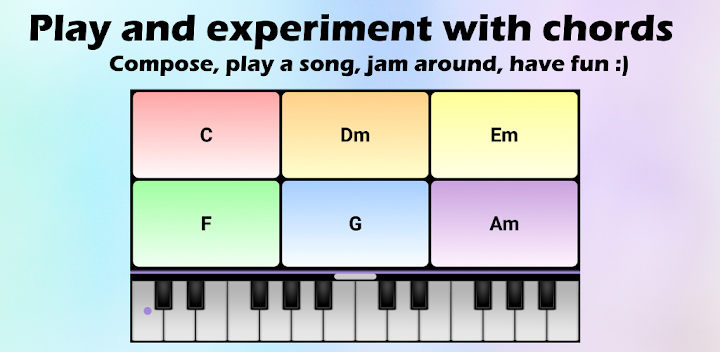
Play and experiment with chords. Compose, play a song, jam around, have fun :)
The Chord Pad is a multi-purpose tool to ...
✔ play and experiment with chords
✔ arrange chord progressions
✔ accompany a song
✔ jam around and have fun 🙂
The Chord Pad is aimed at musicians of all levels. It supports you as a songwriter or composer when composing. It can also be used by anyone to accompany a song without knowing chords or playing an instrument.
The Chord Pad lets you easily experiment with chord progressions and different chord combinations. Listen to how the chords sound and simply rearrange them using drag'n'drop. Explore new chord ideas and develop musical arrangements. Put the sounds in order and develop your own chord progressions.
The Chord Pad supports multi-touch, so you can play several chords at the same time. The volume and one of the more than 100 instruments can be set separately for each chord. The colors can be set using predefined or custom color schemes.
The Chord Pad is part of smartChord and provides you with every conceivable chord (more than 1200 chord types)! You can use it to take over individual chords or all the chords of a song or an existing chord progression. The Chord Pad is seamlessly integrated so that you can open it from the songbook or the circle of fifths with the respective chords to play or experiment with.
✔ Add single chords or add the chord set from a song or chord progression
✔ Choose from 100 instruments for the sound of each chord
✔ The volume can be selected individually for each chord
✔ Multi-touch support to play several chords at the same time
✔ Easily rearrange with drag and drop
✔ Colors according to your color scheme
✔ Full-screen mode
✔ Piano to play melodies. Together with the piano, the result is something like an accordion
✔ Storage to save and organize your pads including the Table of Contents
✔ Share your pads with your bandmates or friends
✔ Sync your pads between your devices
✔ Add links to a pad in songs and notes
✔ Open the Chord Pad with the chords of a song, chord progression, Circle of Fifths, Song Writer...
⭐ Supports all other relevant smartChord features (e.g. left handed fretboard or Solfège, NNS)
Besides, there are many useful things: sharing, sync, backup, themes, color schemes, ... 100% privacy 🙈🙉🙊
A big thank you 💕 for problems 🐛, suggestions 💡 or feedback 💐: info@smartChord.de.
Have fun and success learning, playing and practicing with chords 🎸😃👍
======== PLEASE NOTE ========
This s.mart app is a plugin for the app 'smartChord: 40 Guitar Tools' (V11.1 or later). It can't run alone! You need to install smartChord from the Google Play store:
https://play.google.com/store/apps/details?id=de.smartchord.droid
It provides about 40 other useful tools for musicians like the ultimate reference for chords and scales. Furthermore, there is a fantastic songbook, a precise chromatic tuner, a metronome, an ear training quiz, and a lot of other cool stuff. smartChords supports about 40 instruments like Guitar, Ukulele, Mandolin or the Bass and every possible tuning.
=============================


