
You might like:


About this App
DJ Music Mixer: convenient to remix song, make beat music and edit song.
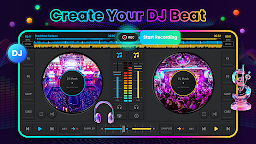
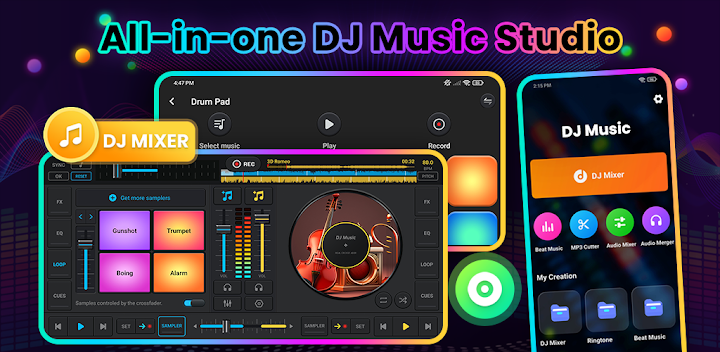
DJ Music Mixer - DJ Mix Studio is a professional DJ mixing tool that meets the mixing needs of DJ practitioners and allows beginners to quickly get started. DJ Mixer Studio has the same functions as a professional DJ console, such as BPM synchronization, hotspot settings, eq adjustment, clip looping, cross push, etc., allowing your phone to instantly transform into a professional DJ console, creating perfect sound effects while allowing multiple songs to naturally and smoothly connect. 💯
DJ Mix Studio - DJ Music Mixer has rich functions and is a diverse music creation tool, suitable for every music creator. You can use it to quickly create music, with an intuitive interface and large buttons that are compatible with the phone screen, making it easy for newcomers to get started. The threshold is extremely low, and you can quickly get started with a few exercises. At the same time, you can use Ringtone Cutter & Audio Merge to edit and crop music, generate the clips you want, and set them as ringtones. 🌈
DJ Music Mixer - virtual DJ Remix Studio helps you to scratch and mix your DJ song like the biggest DJ music makers! 🔥
🎸 Professional DJ Music Mixer - DJ Mix Studio
- Real time display of BPM
- Ten gears EQ adjustment from 31 Hz to 16 kHz
- 14 loop modes from 1/64 to 128 beats
- Up to 6 hotspots can be set, quickly redirecting to preset locations
- Crossfader gradually switch music into
- 27 free sample packages: Beat, Applause, Boing, Clap, Drums, Scratch...
👑 Unique DJ Remix Pad & Beat Music Maker
- 24 sample packages for sound effects (drumming, electronic instruments...)
- Add unique rhythmic soundtracks to your favorite music
- Record Inspiration Moments in High Definition Recording
🎶 Convenient Audio Mixer & DJ Remix Tools
- Professional and convenient audio editing & mixing & merging
- Use edited music as a ringtone or alarm clock
- Interface is simple and easy to operate, quickly cutting song clips
👉 Highlight of DJ Music Mixer - DJ Remix Pad 👈
- Simulate real DJ console layout and adapt to mobile interface
- Real time display of song BPM
- Tone locking ensures BPM adjustments do not affect the tone
- Low latency, fast response operation
- Ten stage EQ adjustment, precise control
- Convenient to carry, can practice anytime or show to friends
- Record your inspirational moments with one click recording
- Multiple fx effects make music more interesting
- Cross pusher can adjust the volume ratio of two tracks
- Wide audio spectrum for better coordination of switching
DJ Music Mixer - DJ Remix Pad is a multifunctional music creation tool that can perform DJ mixing and audio clipping, generating your own exclusive music. Whether you are a professional DJ practitioner or a novice, you can find the joy of DJ here, inspire music inspiration, and also edit music as ringtones. Come and experience the beauty of music!