
You might like:


About this App
VoiceTra is a speech translation application for travel phrases.
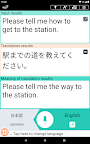
VoiceTra is a speech translation app that translates your speech into different languages.
VoiceTra supports 31 languages and can be downloaded and used for free. With an easy-to-use interface, you can also check if the translation results are correct.
VoiceTra, whether to enhance your travel experience or to welcome visitors to Japan, will definitely come in handy as your personal speech translator.
■Features:
VoiceTra utilizes high-precision speech recognition, translation, and speech synthesis technologies developed by the National Institute of Information and Communications Technology (NICT). It translates your spoken words into different languages and outputs the results in a synthesized voice.
The translation direction can be instantly switched, allowing 2 people that speak different languages to communicate using a single device.
Text input is available for languages that do not support speech input.
VoiceTra is best suited for travel-related conversations and is recommended for situations and places such as below:
・Transportation: Bus, train, rent-a-car, taxi, airport, transit
・Shopping: Restaurant, shopping, payment
・Hotel: Check-in, check out, cancellation
・Sightseeing: Overseas travel, serving and supporting foreign customers
*VoiceTra has also been introduced as a disaster-prevention, disaster-related app.
While VoiceTra can be used as a dictionary to look up words, it is recommended to input sentences as it interprets the meaning from the context to output the translation results.
■Supported languages:
Japanese, English, Chinese (simplified), Chinese (traditional), Korean, Thai, French, Indonesian, Vietnamese, Spanish, Myanmar, Arabic, Italian, Ukrainian, Urdu, Dutch, Khmer, Sinhala, Danish, German, Turkish, Nepali, Hungarian, Hindi, Filipino, Polish, Portuguese, Brazilian Portuguese, Malay, Mongolian, Lao, and Russian
■Restrictions, etc.:
Internet connection is required.
It may take a while to display the translation results depending on the network connectivity.
Languages available for text input are those that the OS keyboard supports.
The characters may not be displayed properly if the appropriate font is not installed on your device.
Please note that some of the functions or the application itself may be disabled when the server is down.
Users are responsible for the communication fees incurred to use the application. Please be aware that international data roaming charges can be expensive.
This application was developed for research purposes; targeting individuals to test it out when traveling, and uses servers that are also setup for research purposes. The data recorded on the server will be utilized to make improvements in speech translation technologies.
You may test out the app for businesses, etc., but please consider using private services that we have licensed our technology to for continuous use.
Please refer to our "Terms of Use" for further details → https://voicetra.nict.go.jp/en/attention.html