You might like:


About this App
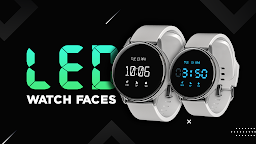
Retro LED watch face for a smartwatch with bold digits & customizable shortcuts
An LED watch face for smartwatch is a digital watch face that mimics the look and feel of a traditional LED watch from the 70s and 80s. The watch face typically displays the time in large, bold digits that are easy to read at a glance, with the hours and minutes separated by a colon.
This app gives the classic seven-segment display styles to set on the Wear OS smartwatch. The app offers different color digital watchfaces. This modern watch face will bring the iconic LED style to the wrist.
How to Set?
Step 1: Install Companion "LED Watchface for smartwatch" app in mobile device & wear OS companion app in watch.
Step 2: For apply shortcuts you have to enable shortcut from mobile side "LED Watchface for smartwatch" then it will reflect on watchside if watch connected and "LED Watchface for smartwatch" default selected.
Note: You can not directly set Shortcut from watch side customization. you have to download mobile side app and set from there only.
LED Watchfaces app gives the shortcut setting option. You set the shortcuts on the smartwatch. You just have to select the shortcut from the given listing and get it set.
Features:
- Simple and easy-to-use
- Digital time display
- Classic, modern, and minimalist designs for wear OS smart watch
- Shortcut customization
Upgrade your smartwatch's style with this unique and visually Neon LED appealing watchface. Download the LED Watchface app now and make your smartwatch truly stand out!
Set LED Watchface for Smartwatch theme for your android wear OS watch and enjoy.
How to Set?
Step 1: Install Android app in mobile device & wear OS app in watch.
Step 2: Select Watch face on mobile app it will show preview on next individual screen. (you can see selected watch face preview on screen).
Step 3: Click on "Tap to sync Face" Button on mobile app to set watch face in Watch.
Please note that we as application publisher don't have control over download & installation issue, We have tested this app in real device (Fossil Model Carlyle HR, android wear OS 2.23, Galaxy Watch4 , android wear OS 3.5).
Disclaimer : Initially we provide only single watch face on wear os watch but for more watchface you have to download mobile app as well and from that mobile app you can apply different watchface on watch.