You might like:


About this App
Give your Wear OS watch a lunar makeover with stunning moon watch faces.
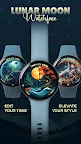
Bring the beauty of the moon to your Wear OS device with Lunar Watch Faces ULTRA SGW7 – the perfect app for lunar enthusiasts. It offers stunning lunar moon-themed watch faces. Watchfaces are easy to apply to your device. The app is filled with user-friendly features for a seamless experience.
Highlighted Features of Moon Watchface App:
• Moon Themed Analog Dials
• Attractive Color Options
• Customizable Complications
• Battery Indicator
• AOD Support
• Supports Wear OS 3, Wear OS 4, and Wear OS 5 devices.
Supported Devices:
The Lunar Watch Faces ULTRA SGW7 app is compatible with Wear OS devices (API Level 30+) that support Google's Watch Face Format.
- Galaxy Watch 7
- Galaxy Watch 7 Ultra
- Pixel Watch 3
- Fossil Gen 6 Smartwatch
- Fossil Gen 6 Wellness Edition
- Mobvoi Ticwatch Series
- Samsung Galaxy Watch 6
- Samsung Galaxy Watch 6 Classic
- Samsung Galaxy Watch5 & Watch5 Pro
- Samsung Galaxy Watch4 and Watch4 Classic and more.
Complications:
You can select and apply the following complications to your Wear OS smartwatch screen:
- Date
- Day of the week
- Day and date
- Next event
- Time
- Steps count
- Sunrise and sunset
- Watch battery
- World clock
Customization & Complications:
• Access Customization: Touch and hold the display.
• Select Customize: Tap on the "Customize" option to begin.
• Personalize Data Fields: In customization mode, adjust the complication fields to display your preferred data.
Install Instructions:
1. Install via Companion App:
• Open the companion app on your phone and tap "Install" on your watch.
• If you don’t see a prompt on your watch, try toggling Bluetooth/Wi-Fi off and on again to resolve the issue.
2. Activate the Watch Face:
• Long press on your watch screen, swipe left, and tap "Add watch face" to activate it from the Downloaded section.