You might like:


About this App
Decibel Meter is an application for measuring sound volume in decibels(dB).
Decibel Meter - Measure Sound Volume with Precision!
Introducing Decibel Meter, the ultimate tool for accurately measuring sound levels in decibels (dB). Whether you're monitoring noise levels in your environment, checking the sound of your music, or simply curious about the volume around you, our app provides real-time measurements and easy-to-understand feedback. With a sleek interface and precise functionality, Decibel Meter is your go-to sound meter for all your acoustic needs.⭐ Real-Time Sound Measurement ⭐
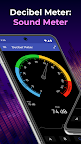
Our db meter offers real-time sound measurement, instantly displaying the current sound volume level on your device. The main indicator not only shows the exact decibel level but also provides a brief explanation of the volume intensity, so you always know what the numbers mean.⭐ Key Features of Decibel Meter ⭐
✅ Accurate Sound Measurements: Get precise sound volume readings in decibels (dB) with our advanced sound meter. Monitor the noise levels around you with ease and confidence.
✅ Real-Time Volume Display: The app continuously updates the current sound level in real-time, making it easy to track changes in your environment's volume.
✅ Volume Timeline: At the bottom of the screen, you'll find a volume value timeline that visually represents sound fluctuations over time, helping you to see trends and patterns in noise levels.
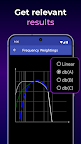
✅ Customizable Calibration: Tailor the app to your specific device with the calibration settings. Adjust the db meter according to your microphone's characteristics for the most accurate readings possible.
✅ User-Friendly Interface: Simple and intuitive, our app is designed for anyone to use. Whether you're a sound engineer or just curious, Decibel Meter makes sound measurement straightforward and accessible.⭐ How to Use ⭐
Open the App: Launch the Decibel Meter to start measuring sound levels instantly.
Monitor Sound Levels: Watch as the main indicator displays the current sound volume in decibels (dB), with a helpful explanation of the sound intensity.
Calibrate for Accuracy: Use the settings screen to calibrate the sound meter according to your device's microphone for optimal accuracy.
Review the Volume Timeline: Check the timeline at the bottom of the screen to observe sound volume changes over time.⭐ Why Choose Decibel Meter? ⭐
✅ Precision at Your Fingertips: Our app provides highly accurate sound level readings, ensuring you always have the most reliable information.
✅ Easy Calibration: Customize the db meter to fit your device's microphone, ensuring precise measurements tailored to your specific needs.
✅ Visual and Intuitive: The combination of real-time data, visual timelines, and clear explanations makes understanding sound levels easier than ever.📱 Download Now!
Start measuring sound levels with precision and ease. Download Decibel Meter today and take control of your environment's noise levels. Whether you need a sound meter for professional use or just want to satisfy your curiosity, our app has you covered. Experience accurate and reliable sound measurement at your fingertips!