You might like:


About this App
Perfect for piano, guitar, drums: master your timing with precision today
Tap Metronome is the most precise and versatile metronome app, designed by musicians for musicians. It's more than just a metronome: it's an essential tool for mastering your timing, improving your practice sessions, and enhancing your live performances.
Key Features:
- Extreme Precision: With our powerful and stable time engine, Tap Metronome offers accuracy superior to traditional mechanical metronomes. Fine-tune your tempo from 40 to 900 BPM (beats per minute).
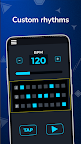
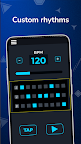
- Custom Rhythm Builder with Integrated Drum Machine: Create and customize your own rhythmic patterns with our intuitive Patterns Panel, which functions as a drum machine. Easily define time signatures, emphasize accent beats, standard beats, and rests. The Patterns Panel allows you to set beat subdivisions per bar (triplets, quarter notes, quintuplets, sextuplets, eighth notes, sixteenth notes, etc.) and practice irregular and complex rhythms.
- Real-Time Tempo Detection (Tap Tempo): Tap at the desired tempo, and the app will detect the pace automatically. Ideal if you're unsure about the exact BPM you need.
- Visual and Vibration Indicators: Follow the tempo visually with on-screen indicators or feel the beat with differentiated vibrations for accented and standard pulses. Perfect for noisy environments or when you need to feel the rhythm.
- Customizable HQ Sounds: Choose from 6 high-quality stereo sounds: classic metronome (mechanical sound), modern metronome, Hi-Hat, Drum, Beep, and Indian Tabla. You can also adjust the pitch to make the metronome easier to hear over your instrument.
- Preset and Setlist Management: Save, load, and delete your own configurations and presets. Organize your practice sessions and performances with ease.
- Silent Mode with Visualizations: Mute the metronome and use visualizations to follow the beat, ideal for rehearsals or situations where sound might be a distraction.
- Advanced Rhythm Subdivision: Practice the timing of your triplets, quintuplets, and other complex patterns with up to 8 clicks per beat. Supports subdivisions and irregular time signatures to improve your rhythmic versatility.
- Intuitive and User-Friendly Interface: Designed with ease of use in mind, with controls for easily increasing and decreasing the tempo and large, clear buttons.
- Universal Compatibility: Suitable for any instrument: piano, guitar, bass, drums, violin, saxophone, vocals, and more. Also useful for activities that require a steady tempo, such as running, dancing, or golf practice.
- Multilingual Support: Available in 15 languages, including international tempo markings (Largo, Adagio, Allegro, Vivace, etc.) for familiarity with classical musical terms.
- Support for Mobile Devices and Tablets: Interface adapted for an optimal experience on any device, in both portrait and landscape modes.
Additional Features:
- Auto-Saved Settings: Your settings are saved automatically upon exit, so you can continue where you left off next time.
- Wide Tempo Range: Select any tempo from 40 to 900 BPM, covering everything from slow practices to fast and demanding pieces.
- Customizable Beat Accents: Choose whether to accent the first beat of the bar or customize accents according to your needs.
- Background Mode: Keep the metronome playing while you use other apps, perfect for reading digital sheet music or following tutorials.
- Tap Tempo Button: Don't know how many beats per minute you need? Use the tap tempo button to select a tempo in real time.
- Visual Beat Indicators: Visual cues to help you stay synchronized in every bar.