You might like:





About this App
Block ads & trackers in apps and games. Fast, private DNS & VPN with Blokada.
🌐 Blokada: Powerful Ad Blocker, Secure DNS & WireGuard VPN
Blokada is the trusted ad blocker that stops ads and trackers on all your Android apps, browsers, and games. Our advanced ad blocking technology, encrypted DNS, and built-in no-log WireGuard® VPN ensure fast, private, and secure online experiences. Enjoy systemwide ad blocking and tracking protection without draining your battery or data. Protect Android, iOS, Windows, macOS & Linux—all with one simple subscription.
🔥 Why Blokada’s Ad Blocker?
• Systemwide ad blocker – Block ads and trackers everywhere: apps, browsers, and games
• Community verified – Open-source adblocker technology trusted worldwide
• Secure DNS filtering – Encrypt DNS requests over TLS/HTTPS to protect your privacy
• Built-in WireGuard VPN – No-log VPN keeps your browsing private and secure
• Cloud-based ad blocking filters – Automatic updates without battery drain
• Optimized performance – Enjoy faster page loads, reduced data usage, and minimal impact on battery
🌟 Key Features of Blokada Ad Blocker
• Advanced ad blocking – Block annoying ads, intrusive trackers, and malware systemwide
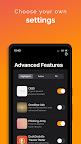
• Tracker control dashboard – See blocked trackers and decide precisely what to allow
• Secure encrypted DNS – Block malicious domains and trackers before they load
• Built-in VPN powered by WireGuard – Fast, secure, private browsing even on public Wi-Fi
• Customizable ad blocking – Enable powerful filter lists to control exactly what gets blocked
• Detailed insights – Track your ad blocker and privacy protection performance
🛡️ Privacy Protection & Transparency
Blokada’s no-log VPN and encrypted DNS ensure maximum privacy. Ad blocking and DNS filtering happen securely in the cloud, reducing battery and data usage. As an open-source ad blocker, Blokada is community-reviewed and trusted globally for data security and privacy protection.
⚡ Performance Optimized Ad Blocker & VPN
Blokada ensures a faster, safer, ad-free internet. Our optimized ad blocking technology reduces data usage, increases browsing speed, and minimizes battery drain, keeping your device running smoothly while enhancing your privacy.
🚀 Easy to Set Up – Start Ad Blocking Immediately!
1. Download Blokada ad blocker from Google Play
2. Enable ad blocking, encrypted DNS, and VPN protection
3. Browse, use apps, and game ad-free and privately!
🎯 Who Benefits Most from Blokada Ad Blocker?
• Privacy-conscious users – block trackers and protect personal data
• Heavy internet users – eliminate ads and speed up browsing
• Gamers – ad blocker reduces distractions and improves performance
• Frequent travelers – stay secure on public Wi-Fi networks with VPN and encrypted DNS
🌈 Take control of your online privacy and security today with Blokada’s industry-leading ad blocker, encrypted DNS, and secure VPN. Download Blokada now and experience online freedom without ads and trackers!
---
Terms of Use: https://go.blokada.org/terms
Privacy Policy: https://go.blokada.org/privacy