You might like:


About this App
A visual time planner that displays daily events in a 12-hour pie chart
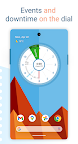
Sectograph is a time planner that visually displays a list of tasks and events for the day in the form of a 12-hour pie chart - a watch dial.
The application will help you sharpen your sense of time and allow you to visualize your day.
HOW IT WORKS
In short, it is a projection of your routine and tasks onto the clock face. It visualizes your day for precise timekeeping and offers you peace of mind.
The scheduler works like an analog clock face. It automatically fetches all the events from your Google calendar (or local calendar) and places them on a 12-hour sectored watch face. This technology can be called a "Calendar clock".
HOW IT LOOKS
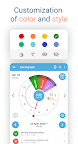
The list of your calendar events is projected in the form of a pie chart in the application and on the home screen widget.
Events are sectors, the beginning and duration of which you can clearly track using special arcs to follow your plan.
A calendar and analog clock combined gives you an amazingly visual representation of your work, allowing you to effectively plan and calculate your day.
WHAT CAN THE APPLICATION BE USED FOR?
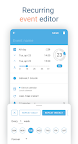
✔ Daily scheduling and visual timing. Track your daily tasks, agendas, appointments, and events in Sectograph, and at any time, find out how much time is left until the end of the current event and the start of the next one. Don't be late.
✔ Accounting and control of working hours. Keep your phone in the docking station at your workstation and your office day plan is under control.
✔ Schedule of classes. Keep your phone close at hand and see how much time is left until the end of those tiring lectures – and never be late for lab work again.
✔ Self-organization at home. Your daily routine is now more convenient than ever. Remember to balance work, rest and physical activity, just use the app as an organizer for your home routine.
✔ Trip timer and flight duration. Do you lose track of time due to endless travel and flights? Visually control your check-in, landing and flight duration. Keep everything under control.
✔ Follow your meal schedule, medication schedule, exercise therapy, and other important activities. Lead the right lifestyle and be healthy!
✔ Convenient countdown of any lengthy scheduled events. Don't miss the end of your vacation and know exactly how many days are left until the end of your military service.
✔ Monitor everyday affairs on the go and in your car. Achieve your goals by keeping the application installed on the device.
✔ Time management using GTD technology. Is planning your day confusing? With the function of striking out or hiding flagged events, keep your chart as clean as possible. Sectograph will improve your time management.
✔ My goals. The app can be used to achieve goals from your Google calendar. It will help you with timekeeping, organize your day, and assist you in completing your goals on time.
✔ Attention-deficit. According to our users, the application is effective for attention-deficit hyperactivity syndrome (ADHD). If you are wasting time and have trouble concentrating on tasks, this app may be useful to you.
✔ The application will be useful for fans of the "Chronodex" concept. You can use the Sectograph as an analog of a paper diary used by this concept.
✔ Display doings from Microsoft Outlook calendar. (beta)
Wear OS
Do you have a Wear OS smartwatch?
Then you get access to:
A watch app with an interactive widget.
A Tile for quick access to the circular planner.
A watch face for continuous schedule awareness (installed separately).
A large complication to enhance and customize some third-party watch faces.
HOME SCREEN WIDGET
Use the day planner widget on your device's home screen.
The widget automatically updates events and its clock once a minute, as well as after any new events appear in the calendar.
You can view details of the event on the widget and access some of its options by clicking on the corresponding sector.
Author and developer: Roman Blokhin