You might like:


About this App
Recordify: Screen recorder with audio & high-quality screen capture for gameplay
Level up your screen video with Recordify - Screen Recorder Video Recorder, the all-in-one screen recording and video making powerhouse. Capture stunning videos, engaging tutorials, winning gameplay, and memorable video calls with effortless ease. From crystal-clear recording to intuitive editing, Recordify has you covered.
🔥Transform Your Screen into a Studio:
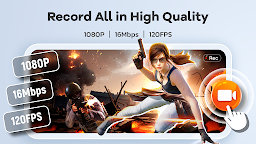
- HD Recording: Capture every detail in breathtaking 1080P, 16Mbps, and up to 120FPS.
- Internal & External Audio: Record crisp, clear audio from your device or microphone.
- Built-in Video Editor: Trim, crop, and rotate your videos for polished, share-worthy content.
- Video to GIF: Turn video highlights into smooth, shareable GIFs with Recordify.
- Facecam Reactions: Add a personal touch with Facecam, perfect for tutorials, reactions, and engaging with your audience.
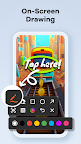
- Live Drawing & Annotation: Explain complex concepts visually with the Brush tool, drawing directly on your screen in real-time.
- Effortless Sharing: Share your masterpieces directly to YouTube, social media, and more with just a tap.
📱Intuitive Control & Workflow with Recordify:
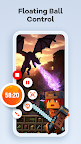
- One-tap Floating Ball: Start, pause, resume, and screenshot with a single touch. Control your recording without interruptions.
- Gesture Control: Customize gestures for quick actions, streamlining your video creation process.
- No Time Limit, No Watermark: Record as long as you need and share your creations without distracting watermarks.
- Customizable Settings: Adjust recording parameters and operation methods to suit your needs.
🚀More Than Just a Recorder - Your Pocket Video Maker:
- Create Engaging Tutorials: Combine screen recording, facecam, and live drawing to produce dynamic and informative tutorials.
- Capture Winning Gameplay: Record your epic victories and share your skills with the world.
- Preserve Precious Moments: Save video calls, live streams, and any on-screen activity with ease.
- Share with the World: Export and share instantly from Recordify.
Try Recordify - Screen Recorder Video Recorder and unlock your potential as a mobile video maker. Start creating and sharing your story!
➡️Contact Us:
The Recordify team values your feedback! Reach out to us at screenrecorder.feedback@gmail.com.
Important Notes:
* Please grant necessary permissions for optimal app functionality.
* Be mindful of privacy when recording.
* Respect copyrights and ensure you have authorization before recording and sharing copyrighted content. Functionality may be limited in certain copyrighted applications.
* Users are responsible for their actions during app usage. Please review our privacy policy and terms of use.