You might like:


About this App
File sharing application: send and receive big files & games. Share anywhere!
🇮🇳 InShare is India's most reliable data transfer & file sharing app.
☀️ InShare is a safe and ultra-fast file sharing app, protecting your privacy and data security during file transfer. You can share it for Android and iOS iPhone devices and send anywhere!
Share Apps & File Transfer - InShare satisfies all your transfer needs perfectly. With our easy share and smart transfer app, just select videos, games, photos, music, apps and pdf files you want to send, then everything will be securely shared with your friends at a lightning speed.
Download Share Apps & File Transfer - InShare to share unlimited joy now!
⚡️Share Files with Flash Speed
- Up to 40Mb/s, 200 times faster than Bluetooth
- Share large videos or files (1G) in less than 30 seconds
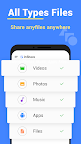
📂Transfer All Types of Files
- Photos, Videos, Songs, Games, Movies, APK or any other files
- Send/Receive multiple files or folders at ONCE
- Find and transfer files easily using the included file manager
🌍Share Files
- Transfer files anytime and send anywhere, less-limited
- Connect to other devices in Hotspot or Wi-Fi mode
🔥KEY FEATURES🔥
+ Support all Android devices, just share it to share files
+ Cross-platform: share files with Android, iOS, Jio Phone, KaiOS, Mac, Windows...
+ Smart replication: data transfer from old phone to new phone
+ One tap to send or receive files at up to 40Mb/s
+ User-friendly design with Open, Install and View options
+ Download received photos and videos directly to the device
+ Powerful file manager with file sorting/searching
+ Share music, share videos, share apps and all types of files
+ Support multiple Indian languages
+ Personal privacy and data security are strictly protected during file sharing
✨NEW FUNCTION✨
Fast Mode feature is aimed at enhancing your file sharing experience with faster speeds and stable connections. Activate Fast Mode and your device will transition from the conventional 2.4GHz frequency to the lightning-fast 5GHz, ensuring smoother and faster transfers.
📲Transfer Tool for Smart Replication
No worry about data loss when operating phone cloning. With the super smart share app, you can easily transfer data from the old phone to the new one, like contacts, SMS, photos, music, videos and apps. You can even migrate files to another device without installing the app.
🗂️Powerful File Manager and Downloader
Files are categorized and can be searched in InShare with a file manager, making it faster and easier to find and transfer files. You can also save the received photos and videos to your device, such as those from YouTube, WhatsApp or Instagram that cannot be downloaded directly.
Please be assured that the request is used for data transfer ONLY. This file sharing and data transfer tool will NEVER harm users.
Thanks for downloading Share Apps, Music & Videos - File Transfer & Data Transfer. And if you have any feedback, please feel free to contact us at videostudio.feedback@gmail.com