You might like:


About this App
Tulip Floral Watch Face for Wear OS
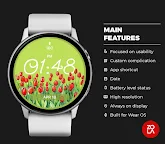
Experience the perfect blend of elegance and technology with the Tulip Floral Watch Face for Wear OS. This stunning watch face features a beautifully designed tulip motif that adds a touch of nature-inspired charm to your wrist. With vibrant colors and intricate details, it transforms your smartwatch into a stylish accessory that complements any outfit.
The Tulip Floral Watch Face is not just about aesthetics, it also offers customizable options, allowing you to choose from various color palettes and styles to match your personal taste. Plus, it provides essential information at a glance, including time, date, and battery life, ensuring you stay organized and chic throughout your day. Elevate your smartwatch experience with this delightful floral design that brings a breath of fresh air to your daily routine!
Main Features:
- Digital time display
- 12/24 hours mode based on device settings
- AM/PM marker
- Battery level status
- Date
- Customizable widget complications
- Customizable app shortcut
- Always on display
- Built for Wear OS smartwatches
Custom Widget Complications:
- SHORT_TEXT complication
- SMALL_IMAGE complication
- ICON complication
Installation:
- Make sure the watch device is connected to the phone
- On the Play Store, select your watch device from the install drop-down button. Then tap install.
- After a few minutes the watch face will installed on your watch device
- Alternatively, you can install the watch face directly from on-watch Play Store by searching this watch face name between quotation marks.
Note:
Widget complications shown in the application description are for promotional only. Custom widget complications data depends on your installed applications and watch manufacturer software. The companion app is only to make it easier to find and install the watch face on your Wear OS watch device.