You might like:


About this App
Access and support a mobile world on the go.
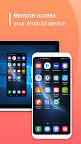
With AweSun Client, you can quickly assist Android devices from computers or mobile devices.
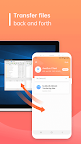
You can transfer files, check your mobile device info, change Wi-Fi settings, etc., and even allow the technician to access your device.
You just need to install AweSun Client on your Android device then you can remote control your Android device anytime you want.
It has never been easier to troubleshoot devices!
Easily support a mobile world on the go.
-------------FEATURES---------------------
• Remote Access phone screen
• View device information
• Transfer files back and forth
• App list (Uninstall apps)
• Push and pull Wi-Fi settings
• View system diagnostic information
• Real-time screenshot of the device
Visit our website https://sun.aweray.com/ for more detailed information to get your remote assistance.
------------HOW TO USE------------------
1. Download and install AweSun Client.
2. The other side, (e.g. the trusted partner), needs to install and start the AweSun on his/her device (download at https://sun.aweray.com/download).
3. Share your Device ID with your trusted partner, who is using the AweSun with Pro or Game Subscription.
Why Accessibility Service API?
AweSun Client harnesses the power of the Accessibility Service API to empower users with diverse needs. This API enables us to deliver two fundamental features: "Remote Control" and "Remote Viewing." Here's how it works:
1. Remote Control: Empowering Access
With Accessibility Service API, AweSun Client allows you to remotely access and manage your devices. This is particularly valuable when physical access is a challenge or convenience is paramount. Whether you're troubleshooting, multitasking, or assisting a colleague, our app ensures a seamless experience by enabling you to control your device as if you were right in front of it.
2. Remote Viewing: Collaboration Redefined
Through the Accessibility Service API, AweSun Client facilitates remote viewing of your device's screen. This feature enhances teamwork, learning, and technical support by allowing real-time sharing of what's displayed on your device. Collaborate effortlessly, seek assistance interactively, and learn cooperatively with the power of remote viewing.
Your Privacy Is Paramount
We understand that your privacy and security are non-negotiable. The Accessibility Service API is used solely to enable the Remote Control and Remote Viewing features. We do not compromise your data integrity by engaging in unauthorized access or data mining. Rest assured, your data remains protected, and your trust is of utmost importance to us.
Accessibility Service APIs will not be used for:
Changing User Settings Without Consent: Accessibility Service APIs should not be used to modify user settings or prevent users from disabling or uninstalling any apps or services without explicit user permission. Exceptions include cases where parental control apps are authorized by parents or guardians using parental control applications, or when authorized administrators use enterprise management software for authorization.
Bypassing Android's Privacy Controls and Notifications: Accessibility Service APIs should not be used to circumvent Android's built-in privacy controls and notification systems. Apps should respect and adhere to the privacy settings and notifications established by the Android operating system.
Deceptive or Violative Interface Alterations: Accessibility Service APIs should not be employed to make deceptive or non-compliant changes to the user interface. Apps should not engage in activities that deceive or violate Google Play Developer Policies in any way.
Remote Call Recording: Accessibility Service APIs should not be used for the purpose of remotely recording calls. This practice is generally not permitted and can raise serious privacy and legal concerns.