You might like:


About this App
Learn word building, reading, writing and spelling - 320 phonics-enabled words
Based on the proven Montessori learning method, Montessori Words helps kids develop their reading, writing and spelling skills by building words from a set of 320 word-image-audio-phonics combinations using a phonics-enabled Movable Alphabet.
➜Top 50 Android Apps For Kids 2013 - SmartAppsForAndroid.com
➜The iPad/iPhone version was mentioned in the New York Times, Wired's GeekDad, and was awarded "Editor's Choice Award for Excellence in Design" by Children Technology Review.
➜ Used in US schools
Common Core State Standard (CCSS):
CCSS.ELA-Literacy.RF.K.1b Recognize that spoken words are represented in written language by specific sequences of letters.
CCSS.ELA-Literacy.RF.K.2 & CCSS.ELA-Literacy.RF.1.2 Demonstrate understanding of spoken words, syllables, and sounds (phonemes).
CCSS.ELA-Literacy.RF.K.3 Know and apply grade-level phonics and word analysis skills in decoding words.
Montessori Words helps kids learn and understand two fundamental concepts:
• First, the app helps kids understand that words are made up of sounds/phonics (phonemic awareness). For each word, your kids can touch the empty rectangles where letters must be dragged to complete the word, and hear the sound the corresponding letter(s) produces.
• Secondly, the app helps kids memorize the phonics associated with letters by providing a phonics-enabled alphabet where kids can touch each letter and hear the associated phonic.
Montessori Words allows you to select words according to their difficulty or sound categories.
• Level 1 displays a three-letter word with no difficulty for beginning readers (CVC words).
• Levels 2 and 3 offer more complex words that contains more complex phonics (as long vowels sounds or blends). • Alternately, your child can choose from 44 sound categories--choose words that contain a specific sound (for example, long a, “k” sound, and so on).
To create an enjoyable experience, the app also includes sounds, animations, and interactive visual effects that are displayed after a word is completed.
Choose capital, lower-case, or cursive letter display for a greater challenge.
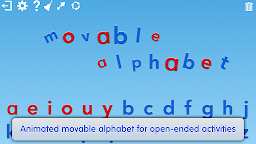
Montessori Words also features a movable alphabet that allows open-ended activities for young children learning their letters.
➜ Overview:
• 320 word-image-audio-phonics combinations appropriate for ages 3/4 to 8 to help kids develop their reading, writing and spelling skills.
• Uses the proven Montessori learning method (Phonemic Awareness and Phonics).
• Phonics-enabled Movable Alphabet (touch a letter to hear its sound/phonic).
• Touch letters of a displayed word to hear the phonics used in the word.
• Select words according to difficulty (3 series - from CVC words to complex words) or sound (44 categories).
• Includes 42 letter sounds/phonics.
• Choose capital, lower-case or cursive letter display.
• 21 fun and colorful interactive visual effects are displayed when a word is completed. Visual effects animate and change as they follow your child’s touch.
• Packed with animations and sounds to create a fun and enjoyable experience!
• Also included is a Movable Alphabet that allows open-ended activities for young children learning their letters.
• Children can play alone or with a parent. Includes instructions on how to use the game as an educational tool.