
You might like:


About this App
Spelling Tests For Kids, Learn to Read & Letters, Movable Alphabet with Phonics
Editor's Choice Award for Excellence in Design - Children's Technology Review
140,000 Units Sold to Schools!
Want to teach your kids to read or spell words? Word Wizard offers several unique reading and spelling activities for children ages 4 to 10:
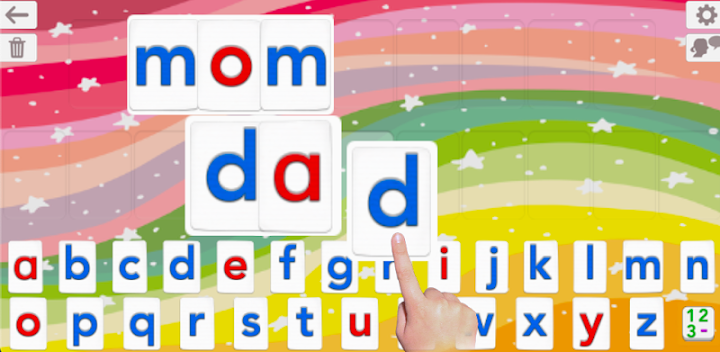
• A talking Movable Alphabet that allows young kids to experiment with phonics and learn word building thanks to the advanced text to speech engine.
• 3 activities to learn to spell that increase in difficulty
• 184 built-in word lists (about 1800 words)
• Add your own words to create unique spelling tests
• Keep tabs on your children’s progress with detailed reports
• Used in US Schools (100K units sold to primary schools & preschools)
• Winner of a Parents’ Choice Award
• Featured in the The New York Times & Wired's GeekDad
• More than 280K units sold!
Talking Movable Alphabet Activity
The talking movable alphabet has been recognized by many teachers as a wonderful tool to teach kids word building and how to learn to read
• Pronounce any word, number or sentence built using the Movable Alphabet
• Natural Sounding US Voice
• Letter sound (phonics) or name when a letter is touched in the alphabet
• Alphabetic or Qwerty Keyboard
• 4 keyboards available: letters, numbers, consonant digraphs (like “th”) and vowels digraphs (like “oo”)
• Uppercase or lowercase letters
• Voice Transformer (speed and tone) for added fun
• Customized word pronunciation, if necessary
• Keyboard emulation option (dragging letters is optional)
3 Fun Spelling Activities
3 spelling activities of increasing difficulty are provided to adapt the activity to the child’s spelling level. You can use the built-in word lists, or create your own.
1 - "Word Practice" says and displays the word to spell, and asks the child to spell it using the talking movable alphabet allowing the child to learn the spelling easily
2 - "Scrambled Letters" says the word and displays the letters needed to build the word or sentence, and asks the child to reorder the letters.
3 - “Spelling Quizzes” is a standard spelling test. The app won’t move onto the next word until the child has correctly spelled the word, helping them to remember its correct spelling.
• 184 built-in word lists of 10 words: Words for beginners, Dolch Words (sight words), 1,000 most frequently used words, body parts and more
• Create custom Word Lists by entering your own words and sentences
• Import and export Word Lists you’ve created
• Hints are available should kids not know how to spell a word
• Colorful animations are displayed when a word is completed
• Once a quiz is completed, interactive animations are available as a reward
Users & Reports
• Unlimited number of users
• Detailed Spelling Test Reports per user
More Accolades
• The New-York Times
"This is an important breakthrough in reading instruction, [...] every letter can be a building block of phonetically accurate sound"
• Children's Technology Review
Editor's Choice Award for Excellence in Design - 4.8 stars out of 5 - "Turn your iPad into a talking alphabet/language generator - and the perfect tool for a child just starting to experiment with letters and their sounds"
• Wired's GeekDad
"This is a fantastic app for young children, right through to children in later elementary school which makes it an app worth having on your iPad."
________
Please send any suggestions to support.android@lescapadou.com. We listen to our users to improve our products!


