You might like:


About this App
Learn to read with Montessori Words - 320 words for kids to read, write & spell
APP FOR KIDS
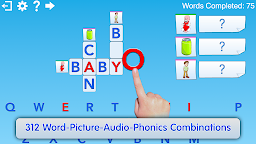
Montessori Words & Phonics is a top-rated educational app for kids based on the proven Montessori learning method. It helps kids develop their reading, writing, and spelling skills by building words from a set of 320 word-image-audio-phonics combinations using a phonics-enabled Movable Alphabet.
LEARN TO READ
Montessori Words & Phonics helps kids learn and understand two fundamental concepts:
First, the app teaches kids that words are made up of sounds/phonics (phonemic awareness) by letting them touch the empty rectangles where letters must be dragged to complete the word and hear the corresponding sound of the letter(s).
Secondly, the app helps kids memorize the phonics associated with letters by providing a phonics-enabled alphabet where kids can touch each letter and hear its corresponding sound.
With Montessori Words & Phonics, kids can select words based on difficulty or sound categories. The app features:
Three levels of difficulty, from simple CVC words to more complex phonics like long vowels and blends.
44 sound categories, allowing children to choose words containing specific sounds such as "long a" or the "k" sound.
The app also includes sounds, animations, and interactive visual effects that are displayed after a word is completed, making it an enjoyable learning experience. Choose between capital, lower-case, or cursive letter display for a greater challenge.
APP FEATURES
320 word-image-audio-phonics combinations for kids aged 3/4 to 8 to help them develop their reading, writing and spelling skills.
Uses the proven Montessori learning method (Phonemic Awareness and Phonics).
Phonics-enabled Movable Alphabet (touch a letter to hear its sound/phonic).
Select words according to difficulty or sound category.
Includes 42 letter sounds/phonics.
Choose capital, lower-case or cursive letter display.
21 fun and colorful interactive visual effects are displayed when a word is completed. Visual effects animate and change as they follow your child’s touch.
Movable Alphabet that allows open-ended activities for young children learning their letters.
Children can play alone or with a parent. Includes instructions on how to use the game as an educational tool.
With Montessori Words & Phonics, kids can learn to read while having fun!
Schools: Contact us at support@lescapadou.com if you want to use the app in your classes.
*** This free version includes the first three sections of the full version for a limited set of words, with only simple words (no crossword), and the 'Focus on Sound' and 'Themes' sections are locked. ***