You might like:


About this App
A modern, modular digital watch for Wear OS. Add the shortcuts & data you need.
Experience true flexibility with the DADAM31: Modern Modular Watch for Wear OS. ⌚ This watch face is designed as a sleek, modern foundation that you can tailor to your exact needs. With customizable slots for both data complications and app shortcuts, its modular design lets you build a display that's as simple or as information-rich as you want. It's the ultimate tool for creating your perfect, functional digital interface.
Why You'll Love DADAM31:
* A Truly Modular Design 🛠️: Start with a clean digital base and add what you need. With flexible slots for both apps and data, you build your own layout.
* Clean & Contemporary Style ✨: A sharp, modern design that prioritizes readability and serves as a stylish foundation for your custom modules.
* You're in Complete Control 🎮: You decide what's important. Create a minimalist look or a data-rich dashboard—the choice is yours.
Key Features at a Glance:
* Bold Digital Time 📟: A large, clear time display serves as the anchor of your modular layout.
* Custom Data Modules ⚙️: Add your favorite data complications. Whether you need weather, fitness stats, or events, you can plug them into the display.
* Custom Shortcut Modules 🚀: Configure several shortcut slots to launch your most-used apps with a single tap.
* Integrated Date Display 📅: The current date is always available on the screen.
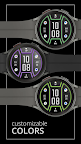
* Full Color Customization 🎨: A versatile color palette allows you to customize every element to match your theme.
* Efficient AOD ⚫: A streamlined Always-On Display that respects your clean layout while saving power.
Effortless Customization:
Personalizing is easy! Simply touch and hold the watch display, then tap "Customize" to explore all the options. 👍
Compatibility:
This watch face is compatible with all Wear OS 5+ devices including: Samsung Galaxy Watch, Google Pixel Watch, and many others.✅
Installation Note:
The phone app is a simple companion to help you find and install the watch face on your Wear OS device more easily. The watch face operates independently. 📱
Discover More from Dadam Watch Faces
Love this style? Explore my full collection of unique watch faces for Wear OS. Just tap on my developer name (Dadam Watch Faces) right below the app title.
Support & Feedback 💌
Have questions or need help with the setup? Your feedback is incredibly valuable! Please don't hesitate to contact me through the developer contact options provided on the Play Store. I'm here to help!