You might like:


About this App
PDF Reader - PDF Viewer, read and manage all PDF files, images to PDF converter
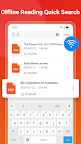
PDF Reader & PDF Viewer is a powerful PDF reading manager that can auto scan, find, and list all PDF files on your phone, allows you to fast open, read and manage your files in one place conveniently, and convert image to PDF easily. PDF reader is the most practical PDF Reader for Android, all functions are free, bringing you an unprecedented PDF reading experience.
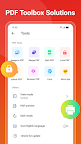
PDF Reader & PDF Scanner also supports convert images( jpg, jpeg, png, etc.) to PDF, merge and split PDF files, set and remove PDF passwords. It has powerful file processing capabilities and provides you with a one-stop PDF file processing solution. This Image to PDF - PDF Maker is exactly what you need!✨
🏅Key Features for Free PDF Reader & Image to PDF Converter:
* PDF file management
* Automatically scan and display all PDF files on your phone
* Display PDF files in a simple list
* Quickly search files and texts by keywords
* Fast open and view documents
* Bookmark PDF pages
* Recently opened files in a simple list for quick viewing
💯Handy and Convenient PDF Viewer
* One-click switch between light and dark mode
* Page by page and continuous scrolling mode
* Horizontal and vertical viewing mode
* Read smoothly with Reflow mode
* Go to the desired page directly
* Zoom in and zoom out pages
* Full screen immersive reading
PDF Reader uses the most advanced technology available today to speed the loading and display of PDF files quickly even with large PDF files.
💪Powerful image to PDF Converter
* Image to PDF: Use free PDF scanner to turn images, receipts and more into PDFs
* PDF Creator: Create a PDF file from multiple images (jpg, jpeg, png, etc).
* Scan clear images into PDF Documents and share as PDF
* Supports converting images(jpg, jpeg, png, etc) to PDF files.
A reliable PDF scanner to convert jpg to pdf. You can merge multiple pictures to a single pdf file and share it as you like. No need to send data to the cloud, easily convert your images to PDF offline.
🎇Merge & Organize PDFs with Free PDF Converter
* Free to combine multiple files into one PDF with PDF converter
* Customize your selections to quickly split a PDF file into multiple parts.
Select the files to be merged, then one-click to generate a new merged PDF file. Easily split PDF documents into multiple files.
🔐Set PDF password with one click
* Set PDF password: Lock PDF with password to keep your documents secure
* Unlock PDF: Enter the correct password to remove the password protection of the file and restore full access to the file.
🖨Easily manage printed PDF
Integrates powerful printing functions. Supports custom printing settings such as page range, paper size, page layout, etc.
Easily read, edit, and manage all your PDF files with this free PDF Reader & PDF Viewer. Image to PDF - PDF Maker also helps you convert images (jpg, jpeg, png, etc.) to PDF files.
Your files will be 100% safe when scanning with this pdf scanner. The entire process of file generation is done locally. This free pdf converter can be used for business purposes as well to convert image to pdf. It's the pdf scanner you can trust to convert jpg to pdf!
Let PDF Reader & PDF Viewer help you improve your work or study efficiency. Come and experience it!🌟